 English
 فارسی
فارسی


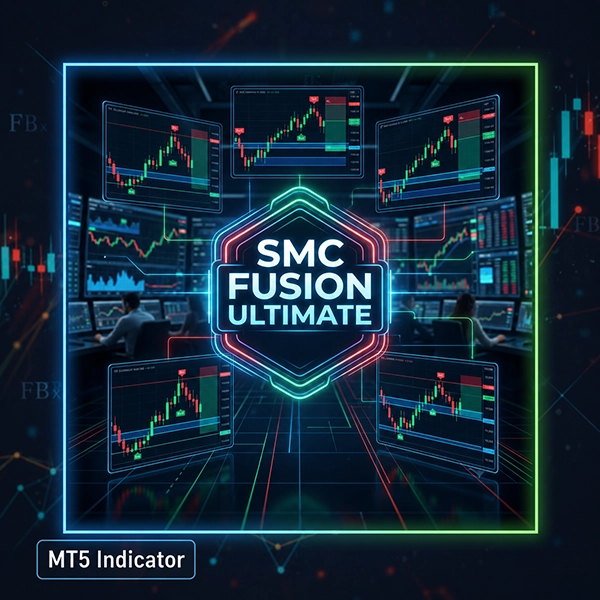
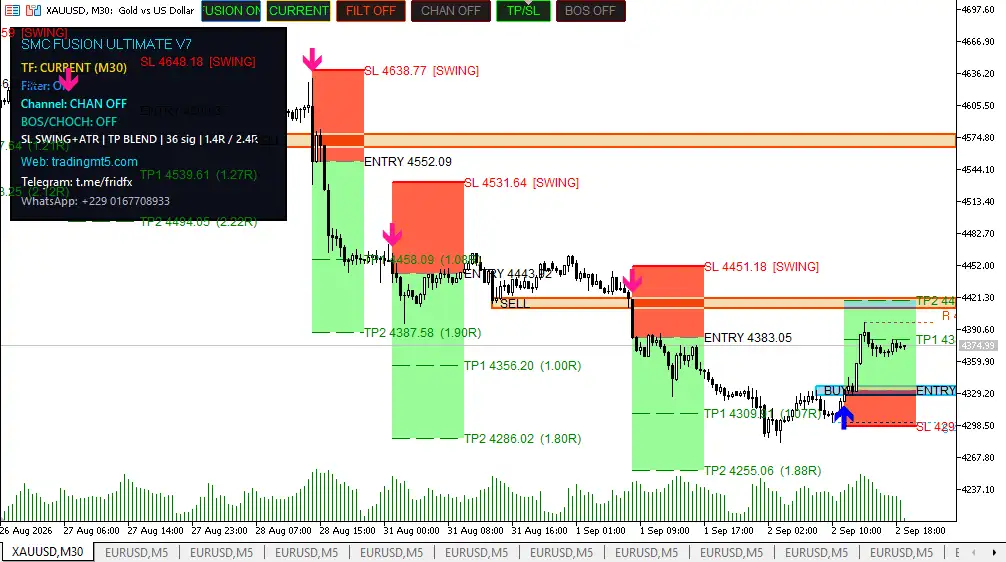
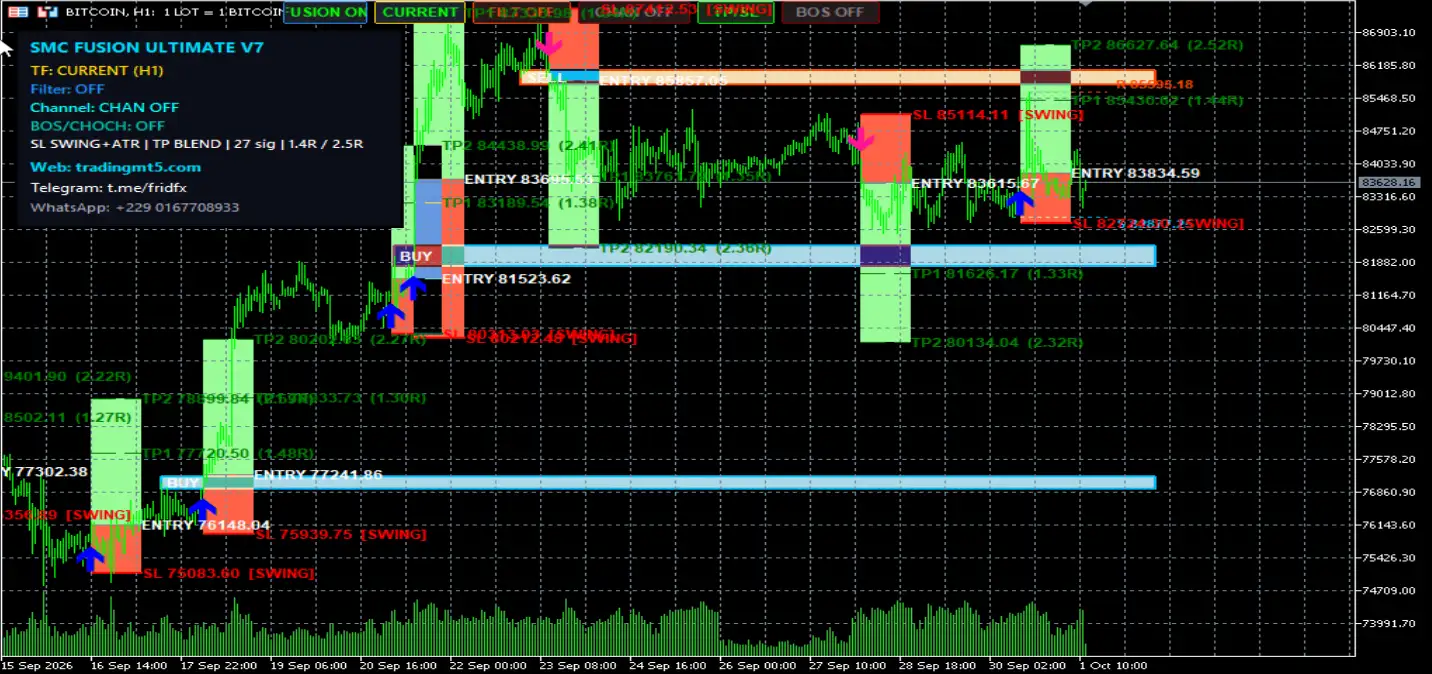
SMC FUSION ULTIMATE MT5 – Advanced Smart Money Concepts Indicator for MetaTrader 5
What Is SMC FUSION ULTIMATE?
SMC FUSION ULTIMATE is an advanced Smart Money Concepts (SMC) indicator for MetaTrader 5 designed to bring multiple institutional-style price-action models into one unified analysis framework.
Instead of requiring traders to install and manually compare numerous individual indicators, the Fusion Engine evaluates multiple SMC and ICT-inspired setups and looks for areas where several conditions align.
The indicator combines 17 trading strategies into a confluence-based signal system. Each model contributes to the overall analysis, while configurable scoring allows traders to determine the minimum level of confirmation required before a signal is displayed.
The result is a structured approach to analyzing market structure, liquidity, imbalances, Order Blocks, Fair Value Gaps, and price reactions from a single MT5 chart.
17 Smart Money Trading Strategies in One Indicator
One of the defining features of SMC FUSION ULTIMATE is its multi-strategy architecture.
The indicator incorporates 17 different models that can contribute to signal confirmation.
1. Inverse FVG
The Inverse Fair Value Gap model identifies potential reversal conditions when price returns to an imbalance zone and reacts from the opposite side.
2. CRT Retest
The Candle Range Theory retest model monitors important candle ranges and looks for price revisits that may precede continuation or further directional movement.
3. Order Block
The Order Block model identifies areas associated with significant price displacement and uses these zones as potential supply or demand references.
4. Mitigation Block
Mitigation Block analysis focuses on previously broken Order Blocks that may be revisited from the opposite side.
5. Propulsion Block
This model looks for areas where Fair Value Gaps and Order Blocks overlap, creating a combined price-action zone for further analysis.
6. Vacuum Block
Vacuum Block logic focuses on significant price gaps or areas with limited trading activity where price may subsequently return or continue through the imbalance.
7. Unicorn Model
The Unicorn model combines Break of Structure (BOS) with a nearby Fair Value Gap to identify a specific SMC/ICT-style confluence setup.
8. Breaker Block
Breaker Block analysis identifies failed Order Blocks that may change their role and become potential opposing supply or demand areas.
9. FVG Re-Entry
The FVG Re-Entry model waits for price to retrace into an established Fair Value Gap before evaluating a potential continuation setup.
10. Balanced Price Range
Balanced Price Range analysis identifies overlapping bullish and bearish Fair Value Gaps, creating an area that can become important for price reaction.
11. Killzone OB
This model focuses on Order Block opportunities during selected London and New York trading sessions, commonly referred to as institutional killzones.
12. CE Raid
Consequent Encroachment logic monitors the midpoint of a Fair Value Gap and looks for price interaction with this area as part of the setup analysis.
13. Swing Failure Pattern
Swing Failure Pattern logic looks for liquidity sweeps beyond previous swing highs or lows followed by a reversal in price behavior.
14. Rejection Block
Rejection Block analysis focuses on candles with prominent wicks around important levels, which may indicate rejection of a particular price area.
15. Supply/Demand Flip
This model detects situations where a broken demand zone may become supply, or a broken supply zone may become demand, followed by a potential retest.
16. Wyckoff Spring / Upthrust
The indicator also incorporates Wyckoff-style range analysis, including Spring and Upthrust formations associated with potential false breakdowns and false breakouts.
17. MSS Entry
Market Structure Shift analysis identifies potential directional changes when price breaks a significant structural point with meaningful displacement.
Fusion Engine and Confluence Scoring
The main concept behind SMC FUSION ULTIMATE is confluence.
Instead of treating every individual setup as an independent signal, the Fusion Engine evaluates how multiple strategies agree with one another.
Each strategy can have a configurable weight, allowing the overall signal to receive a calculated confluence score.
The available quality levels include:
- LOW: 3+ confirmation score
- MEDIUM: 4+ confirmation score
- HIGH: 5+ confirmation score
- ULTRA: 6+ confirmation score
This allows traders to choose whether they want to see more signals with a lower confirmation threshold or fewer signals requiring stronger confluence.
A higher score represents greater agreement between the configured models; it should not be interpreted as a guarantee of a profitable trade.
Fair Value Gap Confirmation Filter
Fair Value Gaps are an important part of Smart Money Concepts analysis.
SMC FUSION ULTIMATE includes an FVG confirmation filter designed to require Fair Value Gap confirmation before a signal is displayed.
This additional condition is intended to filter out setups that do not meet the indicator’s configured imbalance requirements.
FVG analysis can be especially useful when combined with:
- Order Blocks
- Break of Structure
- Market Structure Shifts
- Liquidity sweeps
- Re-entry setups
- Supply and Demand zones
Non-Repainting Signal Architecture
According to the product specifications, SMC FUSION ULTIMATE generates signals using closed bars.
The product is designed around a non-repainting signal approach, meaning completed signals are not intended to be continuously rewritten after the relevant candle has closed.
This can be particularly important when reviewing historical signals because traders can distinguish completed-bar signals from conditions that are still developing on the current candle.
As always, users should verify indicator behavior in their own MT5 environment before relying on signals for live decisions.
Automatic TP and SL Calculation
The indicator can automatically calculate important trade-management levels, including:
- Entry
- Stop Loss
- TP1
- TP2
The calculation uses ATR-based logic and can be adjusted according to the strength of the detected confluence.
The product specifications indicate that stronger confluence can result in different Stop Loss and Take Profit relationships.
These automatically calculated levels are intended to provide a structured framework for trade planning rather than replacing individual risk management.
VWAP Institutional Flow Filter
SMC FUSION ULTIMATE includes an optional VWAP filter.
VWAP, or Volume Weighted Average Price, can be used as an additional directional reference when analyzing market conditions.
The VWAP filter can be enabled or disabled directly from the indicator interface.
When enabled, it adds another condition to the signal framework and can help traders focus on setups aligned with the selected VWAP logic.
BOS and CHoCH Market Structure Detection
Market structure is a major component of Smart Money Concepts trading.
The indicator includes detection for:
- BOS – Break of Structure
- CHoCH – Change of Character
These features help identify structural changes in price behavior and can be configured using different operating modes:
- OFF
- Display Only
- Signal Filter
This allows traders to use market structure information visually or integrate it into the signal-confirmation process.
Multi-Timeframe SMC Analysis
Another important feature is multi-timeframe analysis.
The indicator can analyze different source timeframes while remaining attached to the current chart.
The supported analysis range extends from:
M1 → M5 → M15 → M30 → H1 → H4 → Daily → Weekly → Monthly
This allows traders to maintain a preferred chart while sourcing SMC analysis from another timeframe.
For example, a trader could use a lower-timeframe chart while referencing higher-timeframe market structure and Fair Value Gap conditions.
Smart Trade Management
Once a signal becomes active, the indicator includes a trade-management mechanism designed to reduce conflicting signals.
The system can block new conflicting signals while an active setup remains open, with the management logic continuing until the configured TP2 or Stop Loss condition is reached.
This can help reduce signal stacking and excessive activity in the same market area.
However, traders should still evaluate the resulting exposure and signal frequency under their preferred settings.
Anti-Overlap and Cooldown Protection
Multiple SMC models can sometimes identify similar zones or closely related setups.
To help manage this situation, SMC FUSION ULTIMATE includes:
- Anti-overlap filtering
- Duplicate signal filtering
- Configurable cooldown periods
These mechanisms are designed to reduce repeated signals from the same market area and prevent excessive signal generation during periods of rapid price movement.
Real-Time Trading Alerts
The indicator can provide real-time notifications through multiple MetaTrader 5 alert channels.
Available alert methods include:
- MetaTrader pop-up notifications
- Push notifications to mobile devices
- Email alerts
Trade-related information can include:
- Entry price
- Stop Loss
- TP1
- TP2
- Signal information
This makes the indicator suitable for traders who want to monitor opportunities without remaining continuously focused on the MT5 chart.
Interactive On-Chart Control Panel
The built-in control panel provides direct access to important indicator settings.
Users can change key options directly from the chart, including:
- FUSION ON/OFF
- Source Timeframe
- VWAP Filter
- Signal Quality
- TP/SL Display
- BOS Mode
This provides a convenient way to adjust the analysis framework without repeatedly navigating through the full indicator settings menu.
MT5 Strategy Tester Compatibility
SMC FUSION ULTIMATE is designed to work with the MetaTrader 5 Strategy Tester, including visual testing.
This allows traders to examine historical signal behavior and review how the indicator’s models reacted to previous market conditions.
Historical testing can be useful for studying:
- Signal frequency
- Confluence scores
- Market structure signals
- FVG confirmations
- Entry locations
- TP/SL behavior
- Different timeframes
- Different instruments
Historical performance should not be interpreted as a guarantee of future results.
Multi-Market Compatibility
The indicator is designed to be used across multiple asset classes.
Supported markets include:
Forex
Major and other supported currency pairs can be analyzed using the SMC and Price Action framework.
Gold
XAUUSD can be analyzed using Order Blocks, FVGs, liquidity concepts, market structure, and other SMC models.
Indices
Index markets can also be evaluated using the same multi-strategy framework, subject to broker and symbol specifications.
Cryptocurrency
Crypto markets can be analyzed using the indicator’s market-structure and Smart Money models.
Synthetic Instruments
The product specifications also mention support for Deriv Synthetics, subject to the relevant platform and symbol conditions.
Because each market has different volatility, liquidity, spread, and trading-session characteristics, settings should be evaluated separately for each instrument.
Who Is SMC FUSION ULTIMATE Designed For?
SMC FUSION ULTIMATE can be useful for several types of MetaTrader 5 traders.
SMC and ICT Traders
Traders who already use Smart Money Concepts or ICT-style market analysis can use the indicator to combine multiple setups within one analytical framework.
Price Action Traders
Price Action traders can use the indicator to organize market-structure, liquidity, FVG, and Order Block information.
Algorithmic Traders
Traders interested in systematic analysis can use the coded multi-strategy engine to scan for predefined conditions.
Active Traders
The real-time alert system can help traders monitor potential setups without constantly watching the chart.
Beginners
The interactive control panel provides a simplified interface, while the underlying engine incorporates a broad range of advanced SMC concepts.
Key Features of SMC FUSION ULTIMATE
- Advanced Smart Money Concepts indicator for MT5
- 17 integrated SMC and ICT-inspired strategies
- Fusion confluence scoring engine
- Configurable signal-quality thresholds
- Non-repainting closed-bar signal design
- Fair Value Gap confirmation filter
- Order Block detection
- Mitigation Block detection
- Breaker Block detection
- Propulsion Block detection
- Vacuum Block analysis
- Unicorn Model
- FVG Re-Entry
- Balanced Price Range
- Killzone Order Blocks
- Consequent Encroachment analysis
- Swing Failure Pattern detection
- Rejection Block analysis
- Supply/Demand Flip detection
- Wyckoff Spring and Upthrust models
- Market Structure Shift detection
- BOS and CHoCH analysis
- Optional VWAP filter
- ATR-based TP/SL calculation
- Entry, SL, TP1 and TP2 levels
- Multi-timeframe analysis
- Smart signal management
- Anti-overlap protection
- Configurable cooldown
- MetaTrader pop-up alerts
- Mobile push notifications
- Email alerts
- Interactive on-chart control panel
- MT5 Strategy Tester compatibility
- Forex support
- XAUUSD Gold support
- Index support
- Cryptocurrency support
- Deriv Synthetic instrument support
How to Use SMC FUSION ULTIMATE
A typical workflow can be structured as follows:
Step 1 – Install MetaTrader 5
Install and configure MetaTrader 5 with your preferred broker.
Step 2 – Install the Indicator
Add SMC FUSION ULTIMATE to the MT5 Indicators directory and restart or refresh the platform if required.
Step 3 – Open Your Preferred Market
Select an instrument such as XAUUSD, a Forex pair, an index, or a supported cryptocurrency.
Step 4 – Select the Analysis Timeframe
Choose the chart timeframe and configure the desired source timeframe for the SMC analysis.
Step 5 – Set Signal Quality
Select the preferred confluence threshold, such as LOW, MEDIUM, HIGH, or ULTRA.
Step 6 – Configure Filters
Review the VWAP, BOS/CHoCH, FVG, TP/SL, and other available settings.
Step 7 – Enable Alerts
Activate the preferred pop-up, mobile push, or email notifications.
Step 8 – Test and Evaluate
Use historical visual testing where appropriate and perform forward testing before relying on signals in live trading.
Why Confluence Matters in SMC Trading
One of the challenges of Smart Money Concepts trading is the number of individual concepts involved.
A trader may need to monitor:
Liquidity → Market Structure → BOS/CHoCH → Order Blocks → FVG → Price Reaction → Entry Confirmation
When these elements are analyzed manually, the process can become complex and time-consuming.
SMC FUSION ULTIMATE is designed to organize multiple SMC models into one framework and assign a confluence score based on the configured strategy weights.
The purpose is not to predict every market movement, but to provide a structured way of filtering and organizing potential setups.
Final Overview
SMC FUSION ULTIMATE is a comprehensive Smart Money Concepts indicator for MetaTrader 5 that brings 17 SMC and ICT-inspired trading models into a unified confluence engine.
Its feature set covers major concepts such as Fair Value Gaps, Order Blocks, Breaker Blocks, Liquidity Sweeps, BOS, CHoCH, Market Structure Shifts, VWAP, Wyckoff patterns, Supply/Demand Flips, and Price Action.
With configurable confluence scoring, multi-timeframe analysis, FVG confirmation, ATR-based TP/SL levels, real-time alerts, and an interactive control panel, the indicator is designed to give MT5 traders a more organized approach to Smart Money analysis.
It can be applied to Forex, Gold, indices, cryptocurrency, and supported synthetic instruments, although each market should be evaluated independently because market structure, volatility, liquidity, and trading conditions can differ significantly.
SMC FUSION ULTIMATE is an analysis and signal-generation tool, not a guarantee of profitable trading. Traders should combine its signals with appropriate risk management, understand the underlying concepts, and test the indicator under relevant market conditions before using it for live decisions.
Risk Disclaimer
Trading financial markets involves substantial risk, and losses can exceed expectations depending on leverage, volatility, liquidity, and execution conditions.
Signals generated by an indicator are analytical outputs and do not guarantee profitable trades. Historical signals, visual backtests, or previous market performance do not guarantee future results.
Always use appropriate position sizing and risk management. Test SMC FUSION ULTIMATE on a Demo account before applying its signals to live trading, and make sure you understand the indicator’s settings and the risks associated with your chosen market.














Reviews
There are no reviews yet.