 English
 فارسی
فارسی







Dynamic Liquidity Intelligence MT5 – Automated XAUUSD Breakout Expert Advisor
What Is Dynamic Liquidity Intelligence MT5?
Dynamic Liquidity Intelligence MT5 is an automated Expert Advisor for MetaTrader 5 designed for XAUUSD trading on the M15 timeframe. The EA analyzes recent market structure, volatility, swing highs, and swing lows to identify potential breakout areas and place pending orders accordingly.
Rather than using Grid, Martingale, or averaging techniques, the system manages individual positions with predefined Stop Loss and Take Profit levels. Its pending-order approach uses Buy Stop and Sell Stop orders to participate in potential price breakouts around dynamically identified market levels.
The EA also includes volatility-based trade management, Break-Even functionality, step-by-step Trailing Stop management, and time-based trading filters.
How Dynamic Liquidity Intelligence MT5 Works
The core concept behind Dynamic Liquidity Intelligence MT5 is the identification of potential liquidity and breakout zones.
The EA continuously evaluates recent market conditions and calculates relevant highs and lows based on current volatility. These levels are then used to determine potential locations for:
- Buy Stop orders
- Sell Stop orders
- Stop Loss
- Take Profit
This approach allows the Expert Advisor to adapt its trade levels to changing market conditions rather than relying exclusively on static price distances.
The system is designed around individual trade execution and does not use Grid, Martingale, or position averaging strategies.
Dynamic Market Structure Analysis
Market structure analysis is a central component of the EA.
Dynamic Liquidity Intelligence MT5 monitors price behavior to identify significant swing highs and swing lows. Current volatility is taken into account when determining potential breakout areas.
When qualifying conditions are detected, the EA can place pending orders around these market levels.
This structure-based approach is intended to help the system identify potential breakout opportunities while maintaining predefined trade-management parameters.
Buy Stop and Sell Stop Breakout Trading
The EA uses pending orders rather than relying exclusively on immediate market entries.
Buy Stop Orders
A Buy Stop order can be positioned above a relevant market high, allowing the EA to participate if price moves upward through the selected breakout level.
Sell Stop Orders
A Sell Stop order can be positioned below a relevant market low, allowing the EA to participate if price moves downward through the selected breakout area.
The exact placement of pending orders depends on the EA’s internal market-structure and volatility calculations.
Dynamic Stop Loss and Take Profit
One of the key features of Dynamic Liquidity Intelligence MT5 is its adaptive trade-management logic.
The EA can automatically adjust Stop Loss and Take Profit levels according to current market volatility.
This means the trade-management framework is designed to respond to changing market conditions instead of using a single fixed distance for every setup.
The system also maintains a defined Stop Loss-to-Take Profit relationship for individual trades according to its configured logic.
Traders should still evaluate the resulting risk-to-reward characteristics and understand that Stop Loss execution can be affected by slippage, gaps, spread, and market liquidity.
Automated Break-Even and Trailing Stop
Once a position reaches predefined conditions, the EA can manage the trade automatically.
Break-Even Management
The automatic Break-Even function can move the trade’s Stop Loss according to the configured conditions after sufficient price movement has occurred.
Step-by-Step Trailing Stop
The EA also includes a progressive Trailing Stop mechanism designed to follow favorable price movement according to predefined thresholds.
These tools are intended to manage open positions after entry while reducing the need for continuous manual intervention.
No Grid, No Martingale, No Averaging
Dynamic Liquidity Intelligence MT5 is designed around individual position management rather than progressive recovery systems.
The EA does not use:
- Grid trading
- Martingale lot multiplication
- Position averaging
Each trade is managed individually with predefined Stop Loss and Take Profit parameters.
This design can make the strategy easier to evaluate in terms of individual trade exposure, although every automated trading strategy remains subject to market risk.
Flexible Risk Settings
The product provides three suggested risk profiles:
Risk Profile: Suggested Lot Size
Conservative: 0.01 lot per $1,000 balance
Moderate: 0.01 lot per $500 balance
Aggressive: 0.01 lot per $300 balance
These figures are starting recommendations rather than guarantees or universally appropriate risk levels.
Actual position sizing should take into account account equity, broker contract specifications, leverage, spread, volatility, and the trader’s personal risk tolerance.
Friday Trading Filter
Weekend market closures can create exposure to potential price gaps when the market reopens.
Dynamic Liquidity Intelligence MT5 includes a Friday trading filter designed to stop new trading activity before the weekend close.
This feature can help limit exposure to positions or pending orders during the transition into the weekend.
Holiday Trading Pause
The EA also includes an automatic holiday pause around the New Year period.
Holiday sessions can have different liquidity and market-participation characteristics compared with regular trading periods.
The built-in pause provides an additional scheduling mechanism for avoiding selected holiday trading conditions.
Session-Based Trading Filters
Trading activity can be restricted to specified market sessions.
The session filter allows the EA to operate during selected trading hours rather than continuously throughout the day.
This feature is designed to align the EA’s operation with preferred market periods and standard trading-volume conditions.
Dynamic Liquidity Intelligence MT5 Requirements
For the intended configuration, the following specifications are recommended:
- Trading Symbol: XAUUSD
- Timeframe: M15
- Minimum Deposit: $300
- Recommended Deposit: $500–$1,000
- Account Type: ECN, Raw, or Razor
- Spread: Low-spread conditions recommended
- Minimum Leverage: 1:100
- Suggested Leverage: Up to 1:500
- Execution Mode: Hedging
- VPS: Recommended
Because broker specifications vary, traders should confirm the available XAUUSD symbol, contract size, minimum lot, margin requirements, spread conditions, and execution rules before installation.
Why Low-Spread Execution Matters
Dynamic Liquidity Intelligence MT5 uses pending orders and is designed for XAUUSD on M15. Gold can experience rapid price movements and changes in spread, particularly around important market events and periods of reduced liquidity.
For this reason, low-spread ECN, Raw, or Razor-style account conditions are recommended.
Actual execution can vary between brokers due to:
- Spread
- Slippage
- Liquidity
- Execution speed
- Stop levels
- Contract specifications
- Trading sessions
Testing the EA with the intended broker before live deployment is therefore important.
VPS Recommended for Continuous Operation
A Virtual Private Server (VPS) is recommended when running Dynamic Liquidity Intelligence MT5 continuously.
Because the EA relies on pending orders, automated position management, trading-session filters, Break-Even, and Trailing Stop functions, a stable MetaTrader 5 connection can help maintain uninterrupted operation.
A VPS can reduce the dependence on a personal computer remaining powered on and connected to the broker throughout the trading period.
Installation and Setup
Setting up Dynamic Liquidity Intelligence MT5 follows a straightforward process.
Step 1 – Install MetaTrader 5
Install MetaTrader 5 and connect it to a compatible broker account.
Step 2 – Open an XAUUSD M15 Chart
Open the broker’s XAUUSD symbol and switch the chart timeframe to M15.
Step 3 – Attach the Expert Advisor
Add Dynamic Liquidity Intelligence MT5 to the XAUUSD M15 chart.
Step 4 – Configure Risk
Select the desired lot and risk parameters from the EA’s input settings.
Step 5 – Check Trading Conditions
Verify the broker’s spread, leverage, account type, hedging capability, and XAUUSD contract specifications.
Step 6 – Enable Auto Trading
Make sure MetaTrader 5 Auto Trading is enabled and the EA has permission to trade.
Step 7 – Test Before Live Trading
Run historical testing where appropriate and forward-test the EA on a Demo account before considering live deployment.
Key Features of Dynamic Liquidity Intelligence MT5
- Automated XAUUSD Expert Advisor for MetaTrader 5
- Designed for the M15 timeframe
- Dynamic market-structure analysis
- Volatility-based swing high and swing low detection
- Buy Stop breakout orders
- Sell Stop breakout orders
- Dynamic Stop Loss calculation
- Dynamic Take Profit calculation
- Defined SL/TP relationship
- Automatic Break-Even management
- Step-by-step Trailing Stop
- Individual position management
- No Grid trading
- No Martingale
- No position averaging
- Conservative, Moderate, and Aggressive risk profiles
- Friday trading filter
- New Year holiday pause
- Session-based trading filters
- XAUUSD-focused configuration
- ECN, Raw, and Razor account compatibility
- Low-spread trading conditions recommended
- Hedging execution mode
- VPS recommended
- MetaTrader 5 automated execution
Who Is Dynamic Liquidity Intelligence MT5 For?
XAUUSD Traders
The EA is specifically configured for XAUUSD, making it relevant to traders looking for an automated Gold trading system for MetaTrader 5.
Breakout Strategy Users
Traders interested in pending-order breakout systems can use the EA to automate Buy Stop and Sell Stop execution around dynamically calculated market levels.
Traders Seeking Individual Position Management
The system manages trades individually rather than relying on Grid, Martingale, or averaging strategies.
Automated MT5 Traders
Users who prefer automated execution and position management can run the EA directly from MetaTrader 5.
Traders Using VPS Hosting
A VPS can be useful for traders who want the Expert Advisor to remain operational without keeping a personal computer continuously connected.
Dynamic Liquidity Intelligence MT5 in Summary
Dynamic Liquidity Intelligence MT5 is an automated XAUUSD breakout Expert Advisor for MetaTrader 5 that combines market-structure analysis, volatility-based levels, pending-order execution, and automated position management.
The EA identifies potential swing highs and lows and uses these areas to place Buy Stop and Sell Stop orders. Once a position is active, the system can manage Stop Loss, Take Profit, Break-Even, and Trailing Stop conditions automatically.
Its design avoids Grid, Martingale, and position-averaging techniques, while incorporating configurable risk profiles and trading filters for Friday, holidays, and selected sessions.
The recommended configuration is XAUUSD on M15, with low-spread ECN, Raw, or Razor-style conditions and Hedging account execution. A VPS is also recommended for stable automated operation.
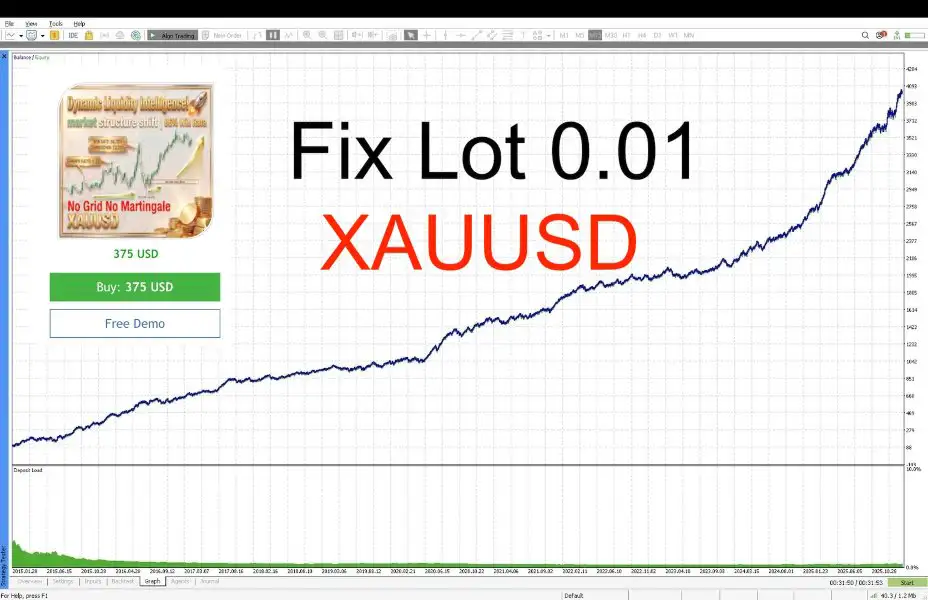
As with any automated trading system, performance depends on market conditions, broker execution, spread, slippage, liquidity, leverage, and configuration. Historical testing or previous performance should not be interpreted as a guarantee of future results.
Risk Disclaimer
Trading financial markets involves substantial risk. XAUUSD can experience rapid price movements, elevated volatility, spread expansion, slippage, and gaps. Leverage can increase both potential gains and potential losses.
The risk settings provided for Dynamic Liquidity Intelligence MT5 are configuration guidelines and do not guarantee a particular level of risk or return. Traders should select position sizes appropriate for their account and risk tolerance.
Always test the EA on a Demo account before using it with real funds. Verify broker compatibility, XAUUSD specifications, spread conditions, execution quality, and account requirements before live deployment.















Reviews
There are no reviews yet.