 English
 فارسی
فارسی








Cosmos Orion MT5: Automated Gold Breakout Trading with Three-Point Structure Analysis
A Structured XAUUSD Trading System for MetaTrader 5
Cosmos Orion MT5 is an automated Gold Expert Advisor designed for trading XAUUSD on MetaTrader 5. Built around an H2 three-point structure breakout strategy, it identifies confirmed price formations and waits for a qualifying breakout before placing an order.
Rather than attempting to predict market direction or relying on grid and martingale recovery methods, Cosmos Orion follows a rule-based approach to trade entry. It analyzes confirmed three-pivot structures on the two-hour timeframe, places pending breakout orders when its conditions are met, and applies predefined Stop Loss and Take Profit levels to every pending order.
The EA also incorporates break-even management, trailing stops, partial take profit, position-sizing controls, spread and margin checks, economic news restrictions, and volatility filters. These features provide a configurable framework for traders interested in systematic gold breakout trading.
Cosmos Orion MT5 is designed for users who want a defined entry methodology and risk-based position sizing without grid trading, martingale progression, or averaging down.
How the Cosmos Orion MT5 Trading Strategy Works
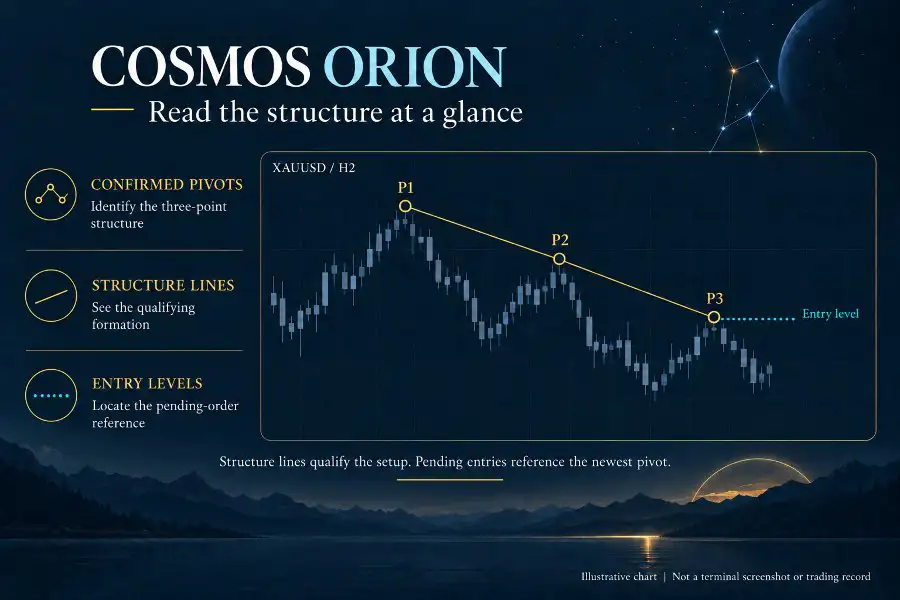
The core of Cosmos Orion is its three-point price structure breakout strategy on the H2 timeframe. The system identifies qualifying formations using confirmed pivots and waits for price to break through a predefined entry level.
This approach separates structure detection from trade execution, helping the EA avoid placing orders solely because an unconfirmed price pattern appears to be developing.
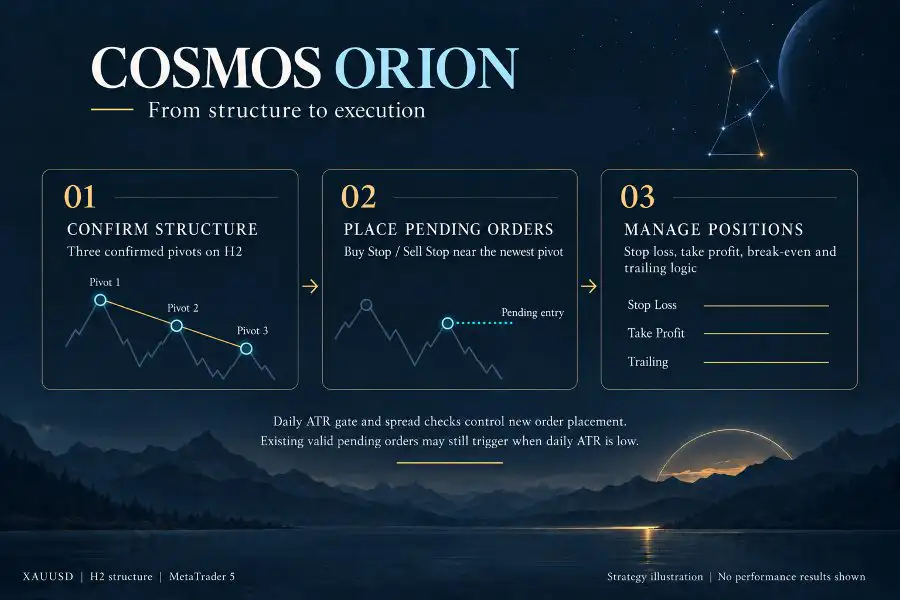
1. Confirmed Three-Pivot Structure Detection
Cosmos Orion MT5 analyzes three-pivot price structures using completed H2 candles. All pivots must be confirmed on closed bars before the formation can qualify.
Using closed-bar confirmation means the EA bases its structural analysis on completed price data rather than treating an unfinished candle as a confirmed signal.
Once a qualifying structure is identified, the EA evaluates the relevant breakout level and prepares the corresponding pending order.
2. Automated Buy Stop and Sell Stop Orders
When a valid structure meets the strategy’s conditions, Cosmos Orion can place a Buy Stop or Sell Stop order near the newest pivot, depending on the identified setup.
A pending order allows the system to wait for price to reach the specified entry level instead of entering immediately when a structure is detected.
If the breakout does not occur within the permitted conditions, or the setup expires or becomes invalid, the EA automatically removes the affected pending order.
This rule-based process is intended to keep entries connected to confirmed market structure rather than anticipated price direction.
3. Consistent H2 Signal Calculations
Cosmos Orion calculates its trading signals on the H2 timeframe regardless of the timeframe displayed on the chart.
This means that attaching the EA to a chart with a different display timeframe does not change the timeframe used for its structural analysis. The underlying entry logic remains based on H2 data.
For traders who prefer to monitor gold on different chart intervals, this separation between signal timeframe and chart display provides additional flexibility.
Automated Exit Management and Trade Protection
A breakout entry is only one part of a complete trading system. Cosmos Orion MT5 also includes several mechanisms for managing open trades and defining exit conditions.
Hard Stop Loss and Take Profit
Every pending order is submitted with a predefined Stop Loss and Take Profit.
The Stop Loss establishes an intended exit level if price moves against the position, while the Take Profit defines a target at which the position can be closed under the order’s configured conditions.
These predefined levels help structure trade management. However, actual execution prices can differ during gaps, slippage, or periods of unstable liquidity, so a Stop Loss cannot guarantee a specific maximum realized loss.
Automatic Break-Even Management
The break-even function moves the stop level beyond the original entry price after the trade achieves the required minimum progress.
This feature is designed to reduce the risk on a position that has moved favorably. Depending on the configured rules and execution conditions, a trade may still close with a small loss because of transaction costs, slippage, or other factors.
Trailing Stop for Profitable Trades
Cosmos Orion includes a trailing stop that follows price as the position moves further into profit.
Instead of relying exclusively on the initial exit level, the trailing mechanism can adjust the stop according to the EA’s rules as price develops. This provides a way to manage a favorable move while retaining a predefined exit mechanism.
Trailing stops can also close positions during temporary retracements, so they do not guarantee that a trade will capture the full market movement.
Partial Take Profit
The partial take-profit feature allows the EA to secure part of a position’s potential gain while leaving the remaining portion open.
This approach is intended to balance realizing a portion of a favorable move with maintaining exposure to a possible continuation. The outcome depends on price movement, position size, and the applicable execution rules.
Price-Relative Exit Distances
Cosmos Orion expresses its exit distances as percentages of the current gold price.
This design allows configured distances to adjust proportionally as the price level of gold changes, reducing the need to retune distances simply because XAUUSD is trading at a different nominal price.
The resulting behavior still depends on the selected settings, broker specifications, and current market conditions.
Built-In Risk Controls for Automated Gold Trading
Cosmos Orion MT5 includes several safeguards intended to regulate new entries and manage trading activity during selected market conditions.
Profit Lock After Consecutive Winning Trades
The profit-lock feature pauses new entries after two consecutive winning trades until the next broker server day.
This rule is designed to restrict further entry activity after a specified sequence of successful trades. It does not guarantee that daily profits will be preserved, and the EA’s handling of existing positions remains subject to its management rules.
Weekend Trading Protection
The weekend guard removes pending orders before the Friday market close and resumes the relevant process on Monday.
Open positions remain under management rather than being automatically abandoned when pending orders are removed.
Because trading hours vary by broker and market conditions, users should verify how the EA’s weekend handling corresponds to their broker’s gold trading schedule.
Macro-Economic News Filter
The macro window guard pauses new entries around major US economic data releases.
Gold prices can react sharply to inflation reports, employment data, central bank announcements, and other macroeconomic events. Such periods can also involve wider spreads and less predictable execution.
The news filter is designed to restrict new trading activity during configured event windows, but it cannot eliminate all news-related volatility or anticipate unexpected announcements.
Volatility Filter
Cosmos Orion includes a volatility filter that blocks new entries when market volatility falls below or rises above its configured boundaries.
This helps the strategy avoid selected low-volatility and unusually volatile conditions according to its rules. The filter does not guarantee that every permitted trade will occur in favorable conditions, and volatility can change rapidly after an order is placed.
Spread and Margin Checks
Before allowing a new order, the EA checks the spread against its configured maximum and performs a margin pre-check that includes a safety reserve.
These checks are intended to reduce the likelihood of entering trades under unsuitable spread or margin conditions. They cannot prevent all execution problems, and available margin can change as prices and open positions fluctuate.
No Grid, No Martingale, No Averaging Down
A defining characteristic of Cosmos Orion MT5 is its breakout-based approach without grid recovery, martingale progression, or averaging down.
The EA does not depend on repeatedly adding positions against an adverse move as its core recovery method. Instead, it combines structure-based pending entries with predefined stop levels and configurable position sizing.
This distinction does not make the EA risk-free. Breakout strategies can produce consecutive losses, failed breakouts, and adverse execution outcomes, making appropriate risk settings essential.
Automatic Broker Time and Daylight Saving Detection
Correctly interpreting broker time is important for systems that use trading-session rules, daily restrictions, and weekend protection.
Cosmos Orion MT5 automatically attempts to detect the broker’s GMT offset and daylight saving time by analyzing the daily gold trading break.
If automatic detection is unsuccessful, the EA can fall back to manual time configuration. The default fallback is GMT+2 with US daylight saving time.
Users should verify the detected time against their broker’s server clock, especially around daylight saving transitions and changes to the broker’s trading schedule. Incorrect time settings may affect when time-dependent protections or trading restrictions operate.
Flexible Position Sizing and Risk Settings
Cosmos Orion MT5 offers several position-sizing modes intended to help traders configure exposure according to their account size and risk preferences.
Risk Levels L1 to L5
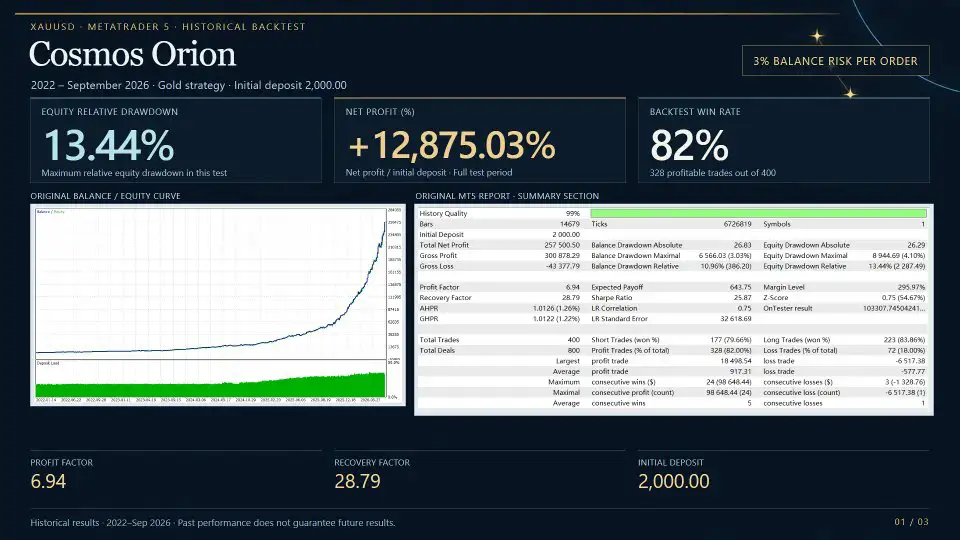
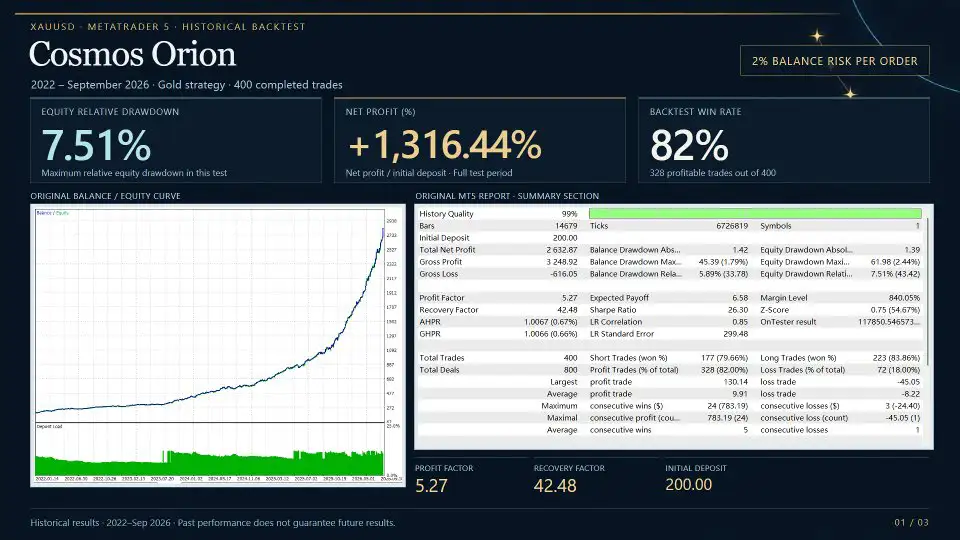
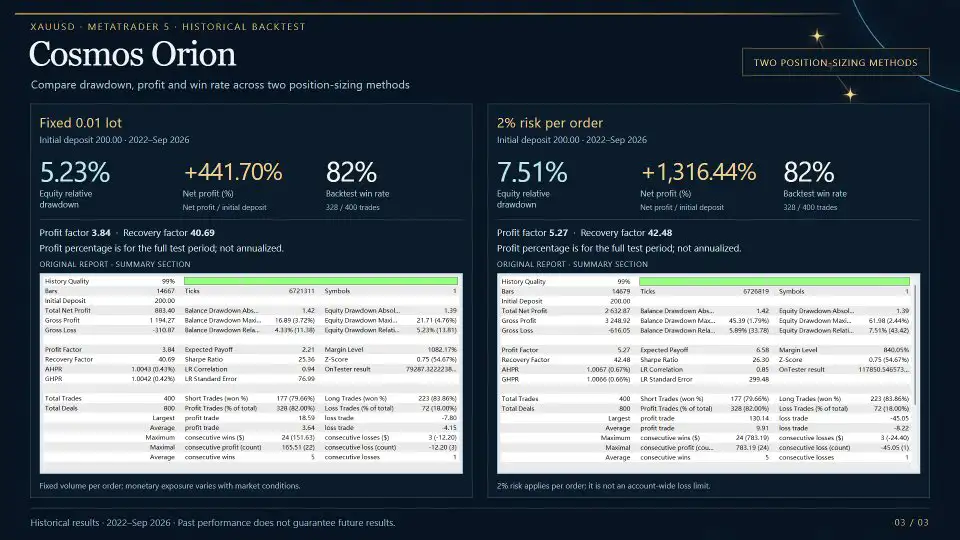
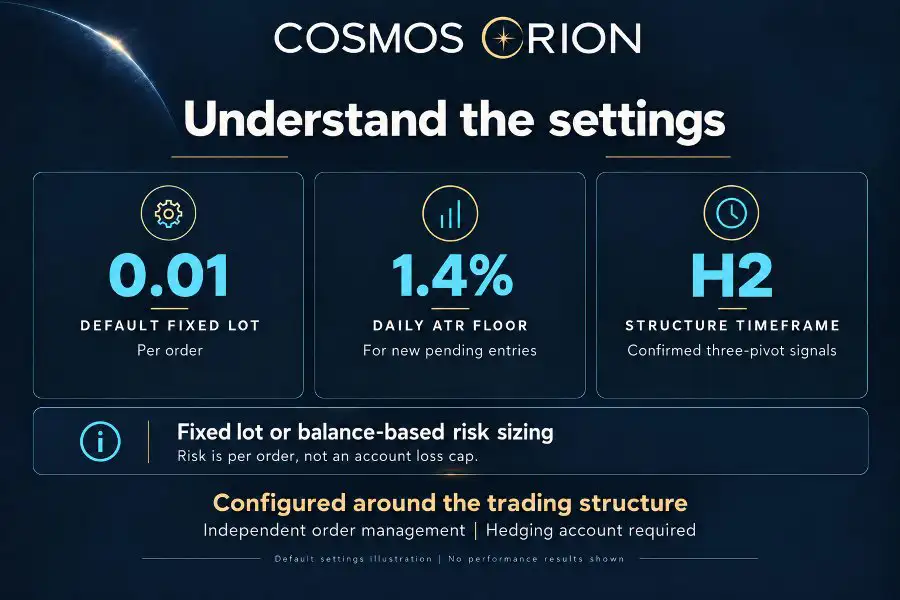
The EA provides five risk levels, ranging from L1 to L5, corresponding to nominal risk settings of 1% to 5% per order.
These settings allow traders to select a risk level that reflects their intended exposure. Higher risk settings can increase both potential gains and potential losses, while a sequence of losing trades can reduce account equity.
The selected percentage should not be interpreted as a guarantee of the final loss under every market condition. Execution gaps, slippage, minimum lot restrictions, and other broker-specific factors can affect actual results.
Current Balance or Initial Balance
Users can choose whether position sizing is based on the current account balance or the initial balance.
- Current balance: Position size can grow or shrink as the account balance changes.
- Initial balance: Position sizing is calculated using the starting balance, supporting a more consistent sizing basis as the account balance fluctuates.
The choice influences how exposure evolves over time. Traders should understand how each mode interacts with their selected risk level and account equity.
Fixed Lot and Custom Risk Percentage
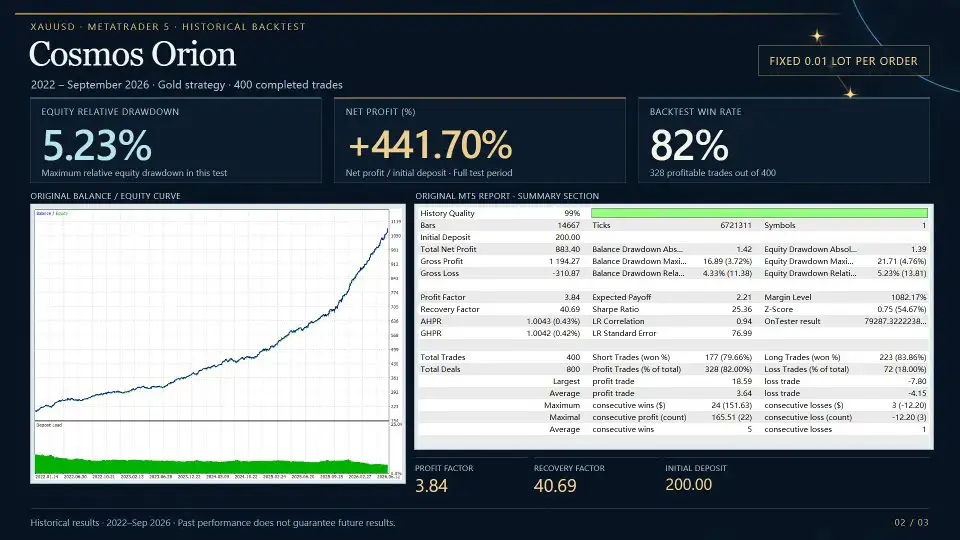
In addition to the L1–L5 profiles, Cosmos Orion supports fixed-lot sizing and a custom risk-percentage mode.
Fixed-lot trading allows users to specify a lot size directly, while custom risk sizing provides a way to set a preferred risk percentage.
Regardless of the chosen mode, traders should verify the resulting lot size against the account balance, Stop Loss distance, contract specifications, and broker volume limits.
Important Consideration for Small Accounts
On smaller accounts, a broker’s minimum permitted lot size—often 0.01 lots—may represent more risk than the selected percentage is intended to allow.
This can occur when the calculated position size is below the broker’s minimum order size and must be rounded up to an acceptable volume.
For that reason, users should confirm the actual monetary risk of the minimum tradable lot before running the EA, particularly when using a small deposit.
Chart Visuals and Status Monitoring
Cosmos Orion MT5 includes chart-based visual tools that help users observe the strategy’s current state and relevant price levels.
The interface can display:
- EA operating status
- Broker time detection results
- Active trading filters
- Detected three-pivot structures
- Potential entry levels
- Separate visual colors for buy and sell setups
These chart elements help users understand how the EA interprets market structure and which conditions may be affecting new entries.
Animations can also be disabled, which may be useful for traders operating the EA on a Virtual Private Server (VPS) or a computer with limited hardware resources.
Visual monitoring supports greater transparency, but it does not replace checking order status, account exposure, and execution conditions.
Cosmos Orion MT5 Requirements and Compatibility
Before installing Cosmos Orion, traders should verify that their trading environment meets the EA’s stated requirements.
Supported instruments: XAUUSD or GOLD, including broker-specific symbol suffixes such as XAUUSD.m and GOLD#.
Platform: MetaTrader 5.
Account type: A hedging account is required. Netting accounts are not supported.
Recommended trading environment: A low-spread ECN or Raw account and a continuously available VPS.
Recommended minimum deposit: $200.
Chart setup: Attach the EA to one chart only.
The recommended $200 starting deposit is a configuration guideline, not a guarantee that the account can safely support every risk level or market condition. The suitability of an account depends on broker contract specifications, minimum lot size, Stop Loss distance, available margin, and the selected risk settings.
Before live deployment, confirm that your broker supports the required account mode and gold symbol, and test the EA using the actual trading environment where possible.
How to Set Up Cosmos Orion MT5
A careful setup process can help identify compatibility issues and clarify how the EA behaves before live trading.
Step 1: Confirm the trading instrument. Check that your broker offers XAUUSD or GOLD and identify the exact symbol name, including any suffix.
Step 2: Verify account compatibility. Make sure your MT5 account uses hedging mode, as netting accounts are not supported.
Step 3: Configure broker time. Review automatic GMT offset and daylight saving detection. If detection fails, check the manual fallback settings against your broker’s server time.
Step 4: Select a position-sizing mode. Choose L1–L5, fixed lots, or custom risk percentage. Review the calculated lot size and ensure it is appropriate for your balance and Stop Loss distance.
Step 5: Configure entry filters. Review the maximum spread, margin reserve, volatility boundaries, macroeconomic news window, and other available settings.
Step 6: Test in the MT5 Strategy Tester. Evaluate how the EA detects H2 structures, places pending orders, removes invalid setups, manages Stop Loss and Take Profit levels, and handles different volatility conditions.
Step 7: Start cautiously. New users should consider demo testing or beginning with the lowest risk setting, L1, while monitoring actual order behavior and account exposure.
Step 8: Use a reliable trading environment. If running the EA continuously, assess the suitability of a VPS and monitor connectivity, broker execution, and platform operation.
Backtesting and demo trading are useful for evaluating system behavior, but neither can guarantee future live trading results.
Who Is Cosmos Orion Gold EA Designed For?
Cosmos Orion MT5 may be relevant to traders who:
- Want to automate XAUUSD breakout trading on MetaTrader 5.
- Prefer confirmed H2 price structures over entries based on unconfirmed pivots.
- Want pending-order execution tied to defined breakout levels.
- Prefer predefined Stop Loss and Take Profit levels.
- Need configurable break-even, trailing-stop, and partial-profit management.
- Want risk-based position sizing without grid or martingale recovery.
- Value built-in spread, margin, volatility, news, and weekend safeguards.
- Can use a compatible hedging account and monitor an automated trading system.
The EA may be less suitable for users who require netting-account compatibility, expect every breakout to succeed, or are unwilling to accept losses from failed signals and changing market conditions.
Final Overview: Cosmos Orion MT5 for Automated Gold Trading
Cosmos Orion MT5 is a gold trading Expert Advisor built around confirmed three-pivot structures and breakout entries on the H2 timeframe. It waits for a qualifying formation, places a Buy Stop or Sell Stop order near the newest pivot, and automatically removes pending orders when the setup expires or becomes invalid.
Its trade-management features include hard Stop Loss and Take Profit levels, break-even adjustments, trailing stops, partial take profit, and price-relative exit distances. Additional controls cover consecutive-win entry pauses, weekend protection, major US economic events, volatility, spreads, and margin availability.
The EA also offers automatic broker time detection, configurable risk-based sizing, fixed-lot and custom-risk options, and chart-based status monitoring. Its design excludes grid recovery, martingale progression, and averaging down as core trading methods.
For traders evaluating an automated XAUUSD breakout system, Cosmos Orion MT5 provides a structured approach to entry selection and position management. Before using it with real funds, users should verify broker compatibility, understand the risk settings, test different market conditions, and confirm that the selected position size is suitable for their account.
Risk Disclaimer
Trading gold involves substantial financial risk. A breakout strategy can generate false signals, consecutive losses, slippage, and unfavorable execution prices. Stop Loss orders do not guarantee execution at the specified price during gaps or unstable market conditions. Risk percentages and minimum-lot restrictions may cause actual exposure to differ from the intended settings. News filters, volatility filters, spread checks, and margin safeguards cannot eliminate all trading risks. The recommended minimum deposit is not a guarantee of suitability or capital protection. Past performance and backtest results do not guarantee future outcomes. Consider testing on a demo account and use only capital you can afford to lose.














Reviews
There are no reviews yet.