 English
 فارسی





Lycan MT5 – Automated Forex Trading Expert Advisor for 28 Currency Pairs
Introduction to Lycan MT5
Lycan MT5 is an automated Forex Expert Advisor designed to trade across 28 major and minor currency pairs using the MetaTrader 5 platform. Described as the bigger sibling of Chiroptera, Lycan follows a single-trade trading approach, with clearly defined Stop Loss and Take Profit levels for each position.
Unlike Chiroptera, which is designed to operate during nighttime hours on the M5 timeframe, Lycan runs throughout the day and uses the H1 timeframe. This gives it a different operating schedule and trading structure, allowing it to monitor the market across a wider range of trading sessions.
The EA is designed to work with all 28 supported currency pairs and provides default settings recommended for different brokers. Its internal learning mechanism also plays an important role in determining position sizes, with optimal lot sizes embedded and updated automatically during live account operation.
Key Features of Lycan MT5
Lycan MT5 combines automated trade execution with predefined risk parameters and an internal learning process.
1. Supports 28 Major and Minor Forex Pairs
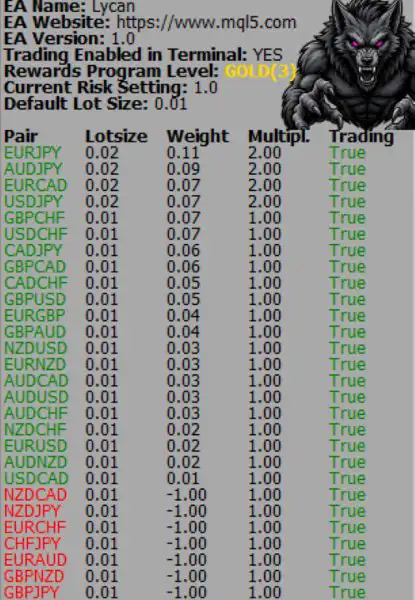
Lycan is designed to operate across 28 major and minor currency pairs. This multi-pair functionality allows users to run the Expert Advisor on different Forex instruments rather than limiting its operation to a single currency pair.
When attaching the EA to a chart, traders should ensure that the selected symbol matches their broker’s naming convention, including any suffix used for currency pairs.
2. H1 Timeframe Trading
Lycan operates on the H1 timeframe, analyzing the market through hourly chart data. This distinguishes it from Chiroptera, which operates on M5.
The H1 configuration provides a different trading frequency and market-analysis structure. Lycan is also designed to operate throughout the day rather than being restricted to nighttime trading hours.
3. Single-Trade Strategy
The EA uses a single-trade approach, opening individual positions with defined protective and profit-target levels.
Each trade includes:
- Stop Loss: A predefined level intended to limit potential losses.
- Take Profit: A specified price level at which the trade is intended to close in profit.
This structure avoids relying on a series of multiple positions as part of the described trading approach. However, Stop Loss and Take Profit levels cannot eliminate market risk or guarantee execution at the requested prices.
4. Automatic Lot-Size Learning
One of Lycan MT5’s distinctive features is its internal learning mechanism for position sizing.
Optimal lot sizes are embedded within the EA and are designed to continue updating through its internal learning process while operating on a live account. Users do not need to manually download or provide separate learning files.
This automatic process is an important consideration when setting up the EA and evaluating its performance over time.
5. Default Settings for Different Brokers
The default configuration is recommended for all brokers. This provides users with a starting point without requiring extensive initial parameter adjustments.
Nevertheless, traders should verify symbol names, suffixes, trading conditions, and account specifications before running the EA on a live account.
How to Install and Run Lycan MT5 on a Live Account
Setting up Lycan MT5 on a live trading account involves a few important steps.
Step 1: Attach the EA to a Chart
Open MetaTrader 5 and attach Lycan to a supported currency pair on any chart timeframe. For example, you can attach it to EURUSD H1.
Although the EA is designed to operate on H1, the chart used for installation can be any timeframe.
Step 2: Check the Currency Pair Name
Some brokers add suffixes or other characters to their trading symbols. Make sure the selected pair matches the exact symbol name provided by your broker.
Step 3: Allow the Required URL
Add the following address to the list of permitted URLs in the Expert Advisor settings:
https://mql.chiroptera.io
Make sure the address is entered correctly so the EA can access the required online service.
Step 4: Allow Automated Trading
Ensure that automated trading is enabled in MetaTrader 5 and that the EA has the necessary permissions to operate.
Step 5: Let the Internal Learning Process Run
Lycan includes an internal mechanism that updates its optimal lot sizes during live account operation. According to the product instructions, users do not need to manage or download separate learning files manually.
For this reason, it is important to understand the learning process before evaluating the EA’s position sizing and backtest behavior.
Backtesting Lycan MT5
Backtesting allows traders to examine how an Expert Advisor behaves using historical market data. Lycan MT5 has specific testing recommendations intended to make the process faster and provide additional diagnostic information.
Recommended Backtest Modeling
For Lycan MT5, using every available tick is not required according to the product instructions.
Instead of selecting Every Tick Based on Real Ticks, users can choose:
- 1 Minute OHLC
This modeling option can make historical testing faster and is the recommended approach for the EA’s backtesting process.
Viewing Detailed Backtest Messages
For more detailed information during testing, users are advised to download Baretail from Baremetalsoft.
After downloading the application, open the PrintMonitor file located in the MetaTrader 5 Common folder. This provides more verbose messaging that can help users review additional information generated during the backtest.
Important: Lycan MT5’s Learning Period During Backtesting
One particularly important detail concerns how Lycan handles position sizing during historical testing.
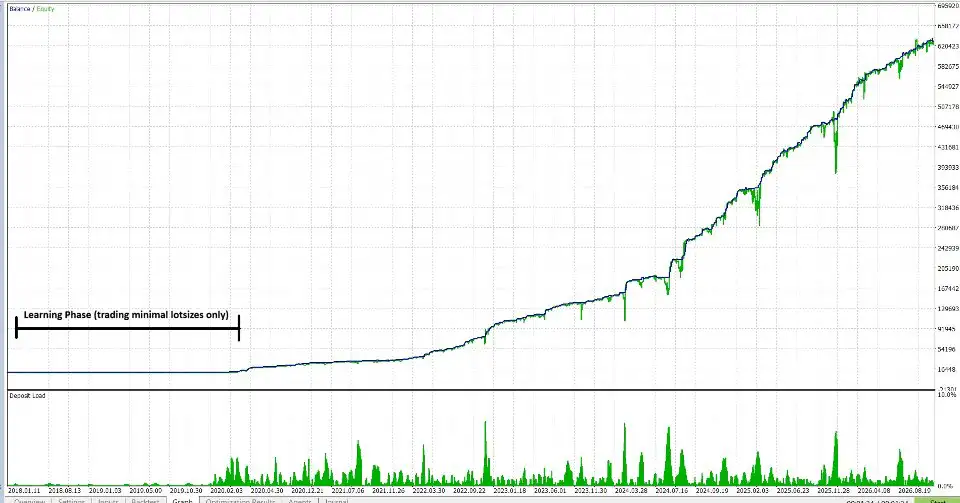
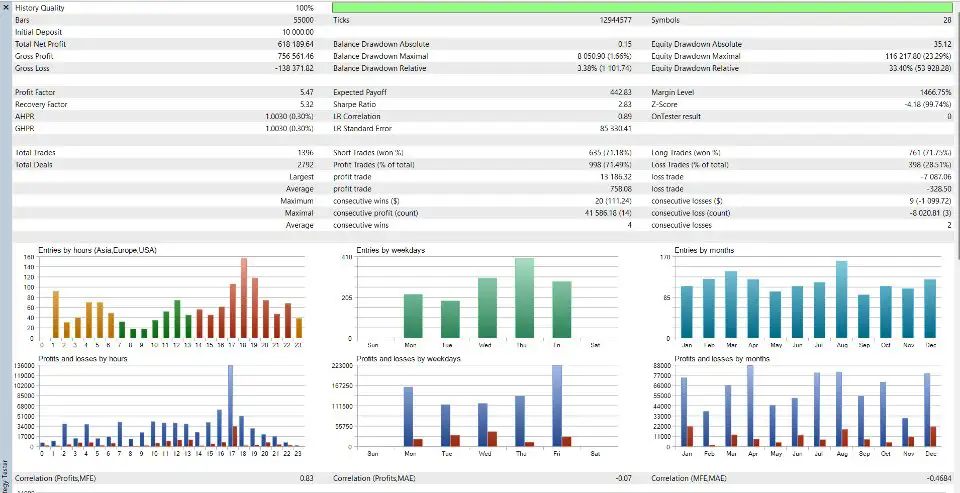
During backtesting, Lycan trades using minimum lot sizes until its internal learning process has converged.
According to the product documentation, this learning period can take approximately 2–3 years.
This means that backtest results from the early learning period may not represent the EA’s intended lot-sizing behavior after learning has converged. Traders should take this into account when selecting historical test periods and interpreting the results.
It is also important not to assume that a short backtest will fully demonstrate the EA’s learned position-sizing behavior. A sufficiently long testing period is necessary to account for the stated learning process.
Lycan MT5 – Important Setup Considerations
Before using Lycan MT5, consider the following points:
- Platform: MetaTrader 5.
- Trading Instruments: 28 major and minor Forex pairs.
- Operating Timeframe:
- Trading Schedule: Designed to operate throughout the day.
- Trading Method: Single-trade approach.
- Trade Protection: Defined Stop Loss and Take Profit levels.
- Recommended Configuration: Default settings.
- Live Account Learning: Automatic internal lot-size updates.
- Backtest Modeling: 1 Minute OHLC recommended.
- Backtest Learning Period: Approximately 2–3 years for learning convergence, according to the product instructions.
- Additional Backtest Tool: Baretail for monitoring detailed messages.
These details are useful when preparing a trading environment and deciding how to evaluate the EA before live deployment.
Why Consider Lycan MT5 for Automated Forex Trading?
Lycan MT5 offers a combination of multi-pair coverage, H1 timeframe operation, predefined trade protection, and automatic lot-size learning.
Its main characteristics include:
- Automated trading across 28 major and minor currency pairs.
- H1 timeframe operation.
- Trading throughout the day.
- A single-trade strategy with defined Stop Loss and Take Profit levels.
- Default settings recommended for all brokers.
- Internal learning that updates optimal lot sizes during live operation.
- No need to manually manage separate learning files.
- Faster backtesting using 1 Minute OHLC.
- Additional diagnostic information through the PrintMonitor file.
For traders considering an automated Forex system, these features provide a clear overview of Lycan’s operating approach and the requirements involved in setting it up.
Risk Disclaimer
Forex trading involves financial risk, and automated trading systems do not guarantee profits. Currency prices can move unpredictably due to economic announcements, market conditions, liquidity changes, and other factors. You may lose some or all of your invested capital.
Although Lycan MT5 uses predefined Stop Loss and Take Profit levels, these settings cannot eliminate trading risk. Slippage, spreads, execution delays, market gaps, and broker-specific conditions may affect the actual outcome of a trade.
The EA’s internal learning process and automatic lot-size updates should also be evaluated carefully. Traders should understand how the learning period affects position sizing and avoid drawing conclusions from backtests that do not adequately account for the stated 2–3-year convergence period.
Before using Lycan MT5 with real funds, test it on a demo account, verify that the required URL and symbol settings are correct, and review its behavior across different market conditions. Use appropriate position sizes and never risk money you cannot afford to lose.















Reviews
There are no reviews yet.