 English
 فارسی







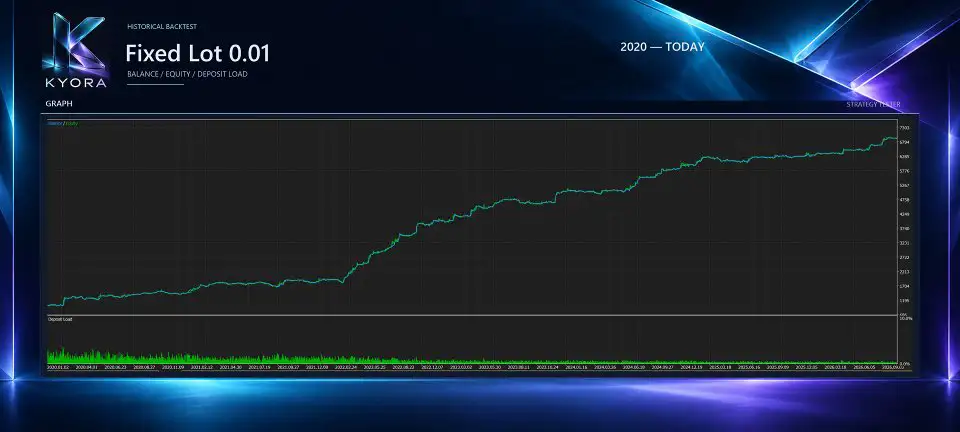
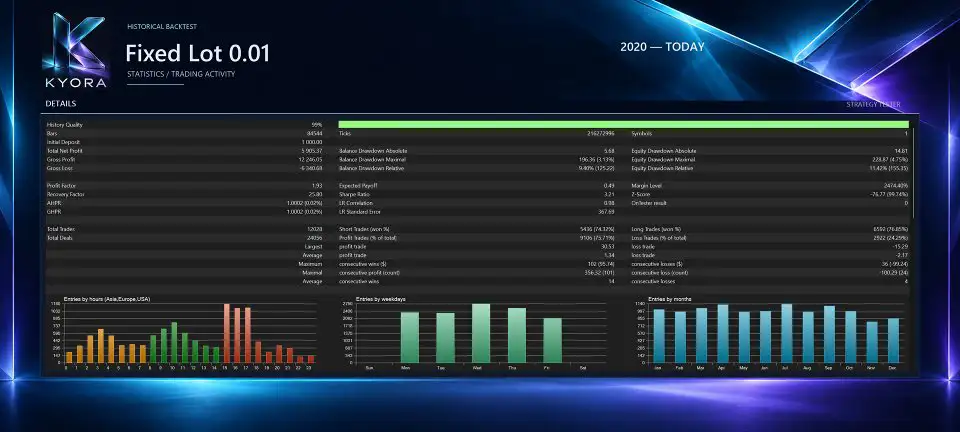
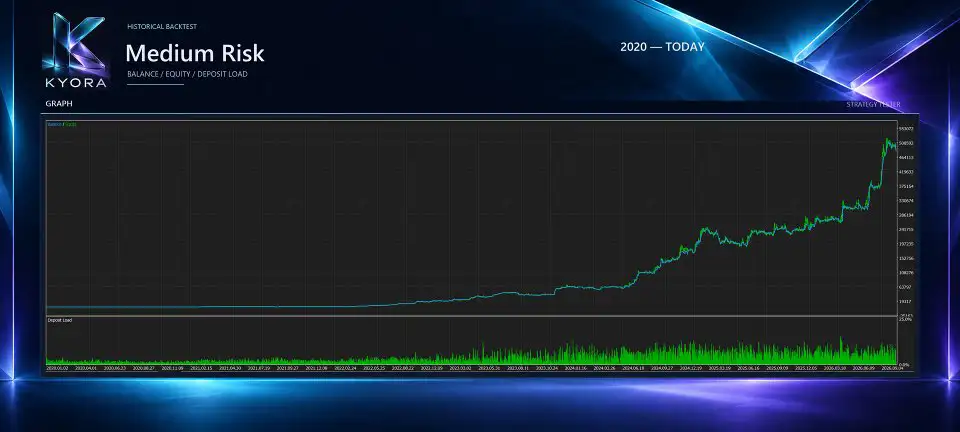
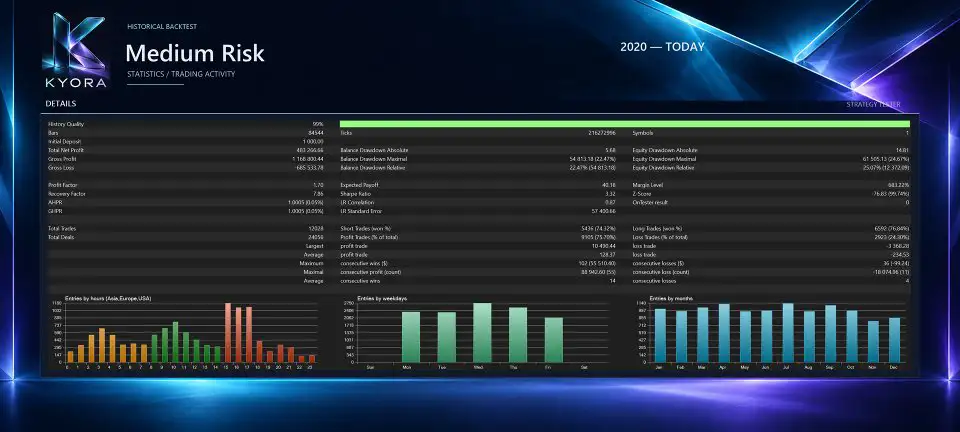
Kyora MT5: Automated USDJPY Breakout Trading with Flexible Strategy Controls
Breakout trading is a popular approach in the Forex market, focusing on price movements beyond predefined levels. For traders interested in automating this method on the USDJPY currency pair, Kyora MT5 offers a dedicated Expert Advisor that combines multiple built-in breakout strategies with automated order management and configurable risk controls.
Developed for MetaTrader 5, Kyora uses Buy Stop and Sell Stop pending orders to enter the market at strategy-defined breakout levels. It brings multiple strategies together in one trading system, allowing users to choose between two operating setups: Balanced and Ultimate.
The EA also provides independent BUY and SELL lot sizing, fixed or automatic volume calculation, individual Stop Loss and Take Profit levels, and optional protection features. Traders can configure economic-news filters, daily loss limits, cycle-based profit and loss targets, and an account-equity emergency stop.
All built-in strategies operate from a single USDJPY chart, creating a centralized environment for managing trading activity.
This review explains how Kyora MT5 works, its main features, available settings, risk-management tools, recommended configuration, and important considerations before using it on a live account.
What Is Kyora MT5?
Kyora MT5 is an automated breakout Expert Advisor specifically designed for trading USDJPY through the MetaTrader 5 platform.
The system combines multiple built-in strategies within one EA. Instead of requiring a separate chart and trading robot for every strategy, Kyora manages its strategy set from a single USDJPY chart.
Its entry mechanism is based on pending orders:
- Buy Stop orders are used for bullish breakout entries.
- Sell Stop orders are used for bearish breakout entries.
These orders are placed at levels determined by the active trading strategies. Each order has its own Stop Loss and Take Profit, while additional trade-management rules can handle break-even and trailing-stop adjustments.
Kyora is designed to give traders control over strategy selection, trading direction, position sizing, and optional account protections without requiring external indicators.
Its main characteristics include:
- Dedicated USDJPY breakout trading.
- Multiple built-in strategies in one Expert Advisor.
- Two selectable operating setups: Balanced and Ultimate.
- BUY-only, SELL-only, or two-direction trading.
- Independent BUY and SELL lot sizing.
- Fixed Lot and automatic balance-based volume calculation.
- Strategy-specific Stop Loss and Take Profit management.
- Break-even and trailing-stop functionality.
- Optional spread and economic-news filters.
- Monetary loss limits and cycle profit targets.
- Account-equity emergency protection.
- An integrated dashboard with trading controls.
How Does the Kyora MT5 Breakout Strategy Work?
Kyora uses pending orders to participate in potential USDJPY breakout movements.
Rather than relying on manual market entries, the EA places Buy Stop and Sell Stop orders at levels determined by its active strategies. When market price reaches a pending order’s entry level, the broker can execute the order according to available market conditions.
Each strategy has its own trading conditions and position-management rules. This allows the EA to coordinate multiple breakout approaches within one system.
The general process involves:
- Evaluating market conditions according to the active strategies.
- Identifying strategy-defined breakout levels.
- Submitting the appropriate Buy Stop or Sell Stop pending orders.
- Applying the configured Stop Loss and Take Profit to each order.
- Managing open positions using the relevant break-even and trailing-stop rules.
Pending orders provide a structured way to automate breakout entries, but execution is not guaranteed at an exact price. Gaps, slippage, spread changes, and liquidity conditions can affect the final entry or exit.
Two Built-In Trading Setups: Balanced and Ultimate
One of Kyora’s main features is its two selectable strategy configurations.
Balanced Setup
The Balanced setup activates a selected combination of Kyora’s built-in strategies.
It provides an alternative for traders who prefer to operate with a defined selection rather than enabling the complete strategy set.
The active strategies determine which breakout opportunities the EA can pursue. The actual number of positions and overall exposure will also depend on trading conditions, order volume, and broker execution.
Ultimate Setup
The Ultimate setup enables the complete built-in strategy set.
This gives the EA access to all strategies included in its full configuration. It also means that multiple strategies may generate trading activity at the same time.
Traders should therefore consider the potential combined exposure rather than evaluating each individual strategy or order volume in isolation.
Choosing Between Balanced and Ultimate
The two setups provide different levels of strategy participation.
- Strategy Selection: Balanced – Selected combination | Ultimate – Complete strategy set
- Operating Approach: Balanced – More selective configuration | Ultimate – Full strategy configuration
- Exposure Considerations: Balanced – Depends on active strategies | Ultimate – Requires attention to combined strategy exposure
Neither setup guarantees better performance. The appropriate choice depends on the user’s risk tolerance, account size, and evaluation of the EA under suitable testing conditions.
Flexible Trading Direction: BUY, SELL, or Both
Kyora allows users to select which trading directions the EA can use.
The available options are:
- BUY only: Allows bullish breakout trading while excluding new SELL entries.
- SELL only: Allows bearish breakout trading while excluding new BUY entries.
- BUY and SELL: Allows both trading directions.
This flexibility can be useful for traders who want to control directional participation.
BUY and SELL volume settings are also independent, so users can configure different lot sizes for each direction rather than applying one volume setting to every trade.
Directional settings and lot sizing should be considered together because they directly influence the account’s potential exposure.
Independent BUY and SELL Lot Sizing
Position sizing is an important part of automated Forex trading. Kyora provides separate volume controls for BUY and SELL orders.
This means traders can define different position sizes for bullish and bearish breakout opportunities.
For example, a user may choose a smaller lot size for one direction and a larger size for the other, depending on the selected configuration and personal risk preferences.
Fixed Lot Mode
Fixed Lot mode allows users to specify the trading volume directly.
The selected lot size determines the volume of individual orders. However, it does not represent the maximum combined exposure of the entire EA.
Because multiple strategies can hold positions simultaneously, total exposure may become significantly larger than the volume of one trade.
Automatic Balance-Based Lot Sizing
Kyora also provides automatic balance-based lot calculation.
This option adjusts order volume according to the selected automatic lot profile and sizing reference. The EA includes selectable Auto Lot profiles and custom sizing references to support different volume configurations.
Users should review the selected calculation method and understand how it affects order volume before activating the system.
Automatic lot sizing does not eliminate risk. If several strategies trade at the same time, combined exposure can still increase substantially.
Automated Stop Loss, Take Profit, and Position Management
Kyora includes trade-management functionality designed to handle positions after pending orders have been executed.
Individual Stop Loss and Take Profit
Each order has its own Stop Loss and Take Profit levels.
These predefined levels establish intended exit points for individual positions and form part of the EA’s automated trade-management framework.
The use of individual protection levels helps the system manage trades according to their associated strategy rules.
However, Stop Loss and Take Profit levels do not guarantee exact execution prices during gaps, slippage, or unusual market conditions.
Break-Even Management
Kyora supports strategy-specific break-even management.
When the relevant conditions are satisfied, the EA can adjust a position’s protective level toward its entry price.
This is intended to reduce the amount of open profit exposed to a subsequent reversal, although trading costs and execution conditions can affect the final outcome.
Trailing Stop Management
The EA also includes strategy-specific trailing-stop functionality.
A trailing stop can adjust the protective exit level as the market moves favorably. If the price reverses, the adjusted level may help preserve part of the unrealized gain.
The break-even and trailing-stop features operate as part of Kyora’s automated position-management framework.
Kyora MT5 Risk Management Features
Kyora includes several optional protection mechanisms that allow users to define monetary limits and control trading activity.
These features are designed to help manage exposure, but they must be configured correctly and cannot guarantee that losses will remain within a specified amount.
1. Daily Loss Limit
The daily loss protection allows users to define a maximum daily loss in account currency.
When the configured condition is reached, the EA can stop opening new trades and request closure of its positions according to the protection settings.
This feature is useful for traders who want a predefined daily risk threshold.
2. Total Cycle Loss Limit
Kyora also supports a total cycle loss limit.
This setting allows users to define a monetary loss threshold for a trading cycle. When the configured limit is reached, the corresponding protection can restrict further trading and request the closure of Kyora’s exposure.
The cycle-based protection is separate from the daily loss setting.
3. Cycle Profit Target
The cycle profit target allows users to define a desired monetary profit threshold for the trading cycle.
When the target condition is reached, the EA can apply the configured protection behavior to its trading activity.
A profit target is a management setting, not a guarantee that the specified amount will be achieved.
4. Account-Equity Emergency Stop
Kyora provides a separate account-equity emergency stop.
Unlike protections that focus on Kyora’s cycle or daily trading results, this feature monitors total account equity.
When the configured emergency condition is reached, the EA acts on Kyora’s own positions and pending orders.
This distinction is important: the feature is designed to manage Kyora’s exposure rather than indiscriminately closing unrelated positions belonging to other trading systems or manual trading activity.
5. Internal Margin Checks
Before submitting new orders, Kyora performs internal margin checks.
These checks are intended to assess whether sufficient margin is available for a new order under the account’s current conditions.
Margin checks can help prevent order submissions when available margin is insufficient, but they cannot eliminate margin-related risk during rapid market movements or changing account conditions.
Important: Optional Protections Are Disabled by Default
The monetary protection settings and news filters are disabled by default.
Users must enable and configure the features they want to use. They should also understand the specific conditions under which each protection becomes active.
Protection settings should not be treated as guaranteed maximum-loss limits because closing orders remain subject to broker execution, liquidity, slippage, and market conditions.
Spread Filtering and Economic News Protection
Forex trading costs and economic announcements can influence breakout strategies. Kyora includes optional filters intended to help manage exposure under selected conditions.
Configurable Spread Filter
The spread filter allows users to define spread conditions for new trading activity.
This can help restrict new entries when the current spread is outside the user’s chosen threshold.
Spread filtering is particularly relevant for USDJPY breakout trading because transaction costs can influence the outcome of individual trades.
However, spreads can change rapidly, and a filter cannot guarantee a fixed execution cost.
Economic News Filter
Kyora includes an optional economic-news filter that uses the MetaTrader 5 economic calendar during connected live or demo operation.
Users can configure pause windows around relevant economic events.
Depending on the selected settings, the EA can:
- Pause new trading activity around scheduled news.
- Request closure of Kyora’s open positions.
- Cancel Kyora’s pending orders.
The exact behavior depends on the configured news-protection options.
Dedicated Nonfarm Payrolls Filter
In addition to the general economic-news filter, Kyora provides a dedicated Nonfarm Payrolls (NFP) filter.
The US Nonfarm Payrolls announcement is a major economic release that can influence currency markets, including USDJPY.
The dedicated filter allows users to configure protection around the NFP event, including pause windows and the available position-closing or pending-order cancellation behavior.
Both news filters depend on the MT5 economic calendar and require a connected platform during operation. Their effectiveness can depend on calendar data availability and the configured settings.
News filters cannot predict or prevent every sudden market movement.
Kyora Dashboard and Integrated Trading Controls
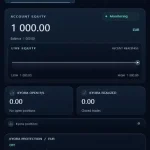
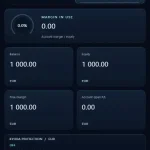
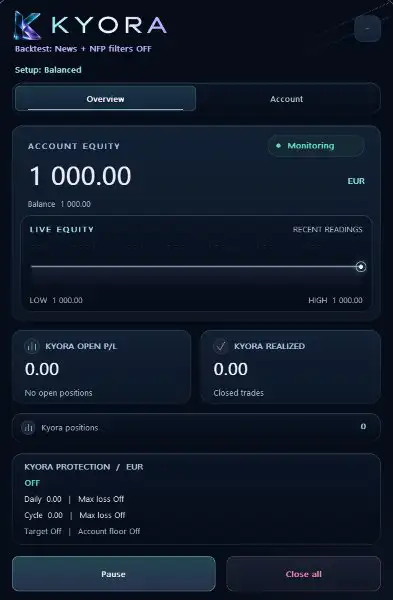
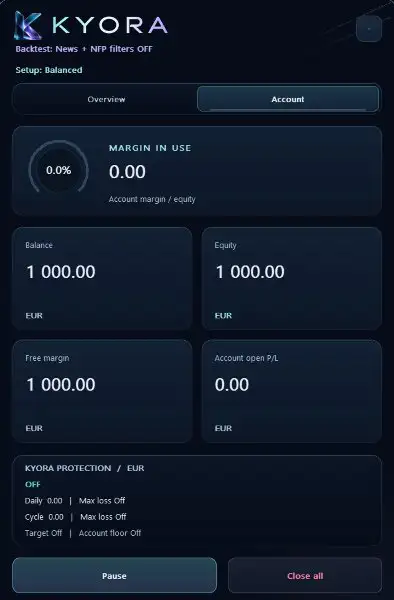
Kyora includes a responsive dashboard that provides an overview of its operating status and trading activity.
Instead of requiring users to inspect multiple charts or separate interfaces, the dashboard centralizes important information in one location.
The displayed information includes:
- Active trading setup.
- Current operating status.
- Trading exposure.
- Floating trading results.
- Realized trading results.
- Protection settings and their status.
The dashboard also provides integrated controls for managing the EA.
Pause and Resume
The Pause control allows users to pause the EA’s trading operation.
The Resume control allows trading activity to continue after a pause, subject to the configured settings and current market conditions.
Close All
The Close All control requests closure of Kyora’s open positions and cancellation of its pending orders.
This command is intended to manage the EA’s own trading activity rather than unrelated manual positions or other Expert Advisors’ trades.
As with all trading operations, the final result depends on broker execution and market conditions.
Position Recognition After a Restart or Reattachment
A useful operational feature of Kyora is its ability to recognize existing positions and pending orders after a MetaTrader 5 terminal restart or EA reattachment.
This functionality is designed to help the Expert Advisor continue managing its existing trading activity rather than treating previously created orders as entirely new positions.
Recognition depends on using the same trading symbol and Magic Number configuration.
Users should therefore avoid changing these identification settings casually when restarting or reattaching the EA. Consistent configuration is important for the intended recognition and management process.
Recommended Kyora MT5 Configuration
The supplied recommendations provide a starting point for setting up Kyora.
- Expert Advisor: Kyora MT5
- Trading Instrument: USDJPY
- Platform: MetaTrader 5
- Recommended Timeframe: H1
- Account Type: Hedging
- Trading Setup: Balanced or Ultimate
- Trading Direction: BUY, SELL, or both
- Position Sizing: Fixed Lot or Auto Lot
- External Indicators: Not required
- VPS: Strongly recommended
1. Use Your Broker’s USDJPY Symbol
Attach Kyora to the USDJPY symbol provided by your broker.
Some brokers use prefixes or suffixes in their instrument names. Users should select the correct symbol corresponding to their broker’s USDJPY market.
2. Use the Recommended H1 Timeframe
The recommended chart timeframe is H1.
Each candle represents one hour of market activity. Users should begin testing with this specified configuration rather than assuming that other timeframes will produce equivalent results.
3. Use an MT5 Hedging Account
Kyora is designed for an MT5 Hedging account.
Before installation, confirm that the broker provides the required account mode. Account compatibility is important for the intended position-management behavior.
4. Use One Active Kyora Instance for the Same Configuration
The recommendation is to use one active Kyora instance for the same trading symbol and Magic Number configuration.
This helps maintain consistent identification and management of the EA’s positions and pending orders.
5. Select Lot Sizes Based on Combined Exposure
When choosing fixed or automatic lot settings, consider the potential activity of multiple strategies.
The volume of one order does not represent the maximum combined exposure. Several strategies may hold positions simultaneously, so the total account exposure can be larger than expected if sizing is not carefully reviewed.
6. Choose a Broker with Suitable Execution Conditions
Competitive spreads, stable pricing, sufficient liquidity, and reliable execution are recommended.
Broker conditions can influence the results of pending-order breakout strategies, particularly during periods of rapid price movement.
7. Use a Stable VPS
A stable Virtual Private Server (VPS) is strongly recommended for uninterrupted operation.
Because Kyora is responsible for monitoring market conditions and managing its trades, a reliable environment can help maintain platform connectivity and ongoing trade management.
A VPS does not guarantee successful execution or protect against all technical and market-related problems.
Why Choose Kyora MT5 for USDJPY Trading?
Kyora is designed for traders looking for an automated USDJPY breakout system with multiple strategies and centralized trade management.
Its main advantages are the combination of strategy selection, directional lot sizing, optional protection tools, and a dashboard-based operating interface.
Multiple Strategies in One Expert Advisor
The EA combines several built-in breakout strategies in one system. Users can select Balanced or Ultimate depending on their preferred strategy configuration.
Independent Directional Position Sizing
Separate BUY and SELL volume settings provide greater control over how the EA allocates trading volume between bullish and bearish breakout opportunities.
Flexible Risk Controls
Optional daily loss, cycle loss, cycle profit, and account-equity protections provide several ways to define trading limits.
Automated News and NFP Filters
The economic-news and dedicated NFP filters allow users to configure how Kyora handles selected scheduled events through the MT5 economic calendar.
Centralized Monitoring and Controls
The integrated dashboard, Pause, Resume, and Close All controls make it easier to monitor and manage Kyora’s activity from its chart.
No Martingale or Grid Averaging
Kyora does not use grid averaging or Martingale lot progression. This distinguishes its approach from systems that increase exposure through repeated averaging or progressive lot sizing.
However, the absence of these methods does not eliminate the possibility of losses or significant drawdown.
Important Risk Considerations Before Using Kyora
Although Kyora includes several protection and trade-management features, automated Forex trading involves substantial risk.
Users should pay particular attention to the following considerations:
- Combined exposure: Multiple strategies may hold positions at the same time, increasing total exposure beyond the volume of one order.
- Pending-order execution: Buy Stop and Sell Stop orders may be affected by slippage, gaps, and changing spreads.
- Margin requirements: Sufficient free margin is essential, especially when multiple positions are active.
- Optional protection settings: Monetary protections and news filters are disabled by default and must be configured.
- Platform availability: The EA requires a functioning MetaTrader 5 environment to monitor and manage trading activity.
- Broker differences: Spreads, liquidity, commissions, swaps, and execution quality can produce different results across brokers.
- News-related volatility: Economic calendar filters cannot prevent every unexpected event or sudden market movement.
A careful evaluation should include appropriate testing, conservative initial position sizing, and an understanding of the EA’s potential combined exposure.
Frequently Asked Questions About Kyora MT5
1. What Is Kyora MT5?
Kyora MT5 is an automated breakout Expert Advisor designed specifically for USDJPY trading on MetaTrader 5. It combines multiple built-in strategies with automated pending-order execution and position management.
2. Which Currency Pair Does Kyora Trade?
Kyora is designed for USDJPY. It should be attached to the corresponding USDJPY symbol provided by the broker, including any normal prefix or suffix.
3. Which Timeframe Is Recommended?
The recommended chart timeframe is H1.
4. How Does Kyora Enter Trades?
Kyora uses Buy Stop and Sell Stop pending orders at strategy-defined breakout levels. Each order includes its own Stop Loss and Take Profit.
5. What Is the Difference Between Balanced and Ultimate?
Balanced activates a selected combination of built-in strategies, while Ultimate enables the complete strategy set.
6. Can I Trade Only BUY or Only SELL?
Yes. Kyora supports BUY-only, SELL-only, and both-direction trading.
7. Can BUY and SELL Lot Sizes Be Different?
Yes. The EA provides independent BUY and SELL lot sizing, with Fixed Lot and automatic balance-based sizing options.
8. Does Kyora Use Martingale or Grid Trading?
No. Kyora does not use grid averaging or Martingale lot progression.
9. Does the EA Include Stop Loss and Take Profit?
Yes. Each order has its own Stop Loss and Take Profit, with additional strategy-specific break-even and trailing-stop management.
10. Does Kyora Have Daily Loss Protection?
Yes. It offers optional daily loss protection, total cycle loss limits, and cycle profit targets measured in account currency.
11. Does Kyora Include an Account-Equity Emergency Stop?
Yes. Its separate equity emergency stop monitors total account equity and acts on Kyora’s own positions and pending orders when the configured condition is reached.
12. Does Kyora Support Economic News Filtering?
Yes. It includes an optional MT5 economic-calendar filter and a dedicated Nonfarm Payrolls filter. Users can configure pause windows and available order-management actions.
13. Are the News Filters Enabled by Default?
No. The news filters and monetary protection settings are disabled by default and must be enabled and configured by the user.
14. Can Kyora Recognize Trades After a Terminal Restart?
Yes. It can recognize existing positions and pending orders after a terminal restart or EA reattachment when the same trading symbol and Magic Number configuration are used.
15. Does Kyora Require External Indicators?
No external indicators are required according to the supplied product specifications.
16. Is a VPS Recommended?
Yes. A stable VPS is strongly recommended to support uninterrupted platform operation and ongoing trade management.
Final Verdict: Is Kyora MT5 Worth Considering?
Kyora MT5 is a dedicated USDJPY breakout Expert Advisor that combines multiple built-in strategies with automated pending-order execution and configurable risk-management features.
Its two operating setups, Balanced and Ultimate, allow users to choose between a selected strategy combination and the complete strategy set. Independent BUY and SELL lot sizing provides additional control over directional exposure, while Fixed Lot and automatic balance-based sizing offer different volume-management approaches.
The EA also includes individual Stop Loss and Take Profit levels, break-even and trailing-stop management, optional spread filtering, economic-news and NFP protection, monetary loss limits, and a separate account-equity emergency stop.
An integrated dashboard brings trading information and operational controls together on one USDJPY chart. Its ability to recognize existing positions and pending orders after a terminal restart or reattachment also supports continuity when the same symbol and Magic Number configuration are maintained.
For traders seeking automated USDJPY breakout trading on MetaTrader 5, Kyora offers a structured combination of strategy selection, flexible position sizing, and centralized trade management.
The most important consideration is overall exposure. Multiple strategies can hold positions simultaneously, so users should assess combined lot volume, free margin, and potential losses before enabling the EA on a live account.
Kyora MT5 — Multi-Strategy USDJPY Breakouts. Flexible Position Sizing. Configurable Risk Management.
Risk Disclaimer
Trading leveraged Forex products involves substantial financial risk and may result in the loss of some or all invested capital.
Kyora MT5 does not guarantee profits, and past performance does not guarantee future results. Backtests, historical statistics, demonstrations, and other performance information should not be treated as reliable predictions of future trading outcomes.
The EA’s pending orders, Stop Loss levels, Take Profit levels, and protective closing actions remain subject to broker execution, liquidity, slippage, price gaps, and changing market conditions. Actual losses may exceed intended protection levels.
Multiple strategies may hold positions simultaneously. Fixed Lot and Auto Lot settings define the volume of individual orders, not the maximum combined exposure of the EA. Users must assess total exposure and available margin before trading.
Optional monetary protections and news filters are disabled by default. Users are responsible for enabling and configuring these features according to their own requirements. No protection mechanism can eliminate all trading risks.
Live results may differ because of spreads, slippage, liquidity, commissions, swaps, broker execution, account specifications, platform availability, and market volatility.
This Expert Advisor is a software tool, not financial or investment advice. Users are responsible for testing, configuration, risk management, and all trading decisions. Only trade with capital you can afford to lose.














Reviews
There are no reviews yet.