 English
 فارسی
فارسی



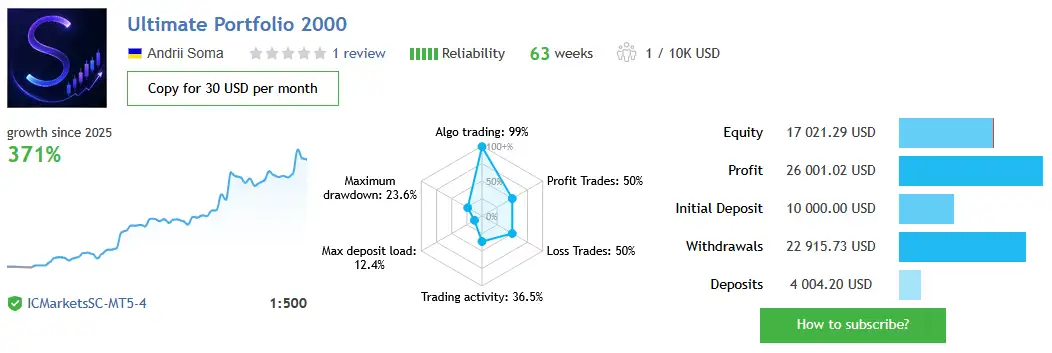
Ultimate Portfolio 2000 EA MT5: A Multi-Strategy Breakout Trading System
Ultimate Portfolio 2000 EA MT5 is a multi-strategy breakout Expert Advisor designed for the MetaTrader 5 trading platform. It combines 41 pre-configured trading strategies in one integrated system, covering Gold (XAUUSD) and four major index CFDs: US30, US500, USTEC, and DE40.
Rather than relying on a single trading setup, Ultimate Portfolio 2000 brings together multiple independent strategies within one Expert Advisor. Each strategy operates with its own magic number, trading parameters, exit settings, news-filter windows, and lot-sizing configuration. This structure helps traders manage a multi-asset trading portfolio without having to install and maintain dozens of separate EAs.
With integrated risk controls, customizable trading sessions, a built-in US economic news filter, optional prop firm compliance features, and a detailed on-chart dashboard, Ultimate Portfolio 2000 offers a configurable framework for automated breakout trading on MT5.
41 Independent Strategies in One Expert Advisor
The central feature of Ultimate Portfolio 2000 is its collection of 41 pre-tuned strategies. All strategies use the same core trading engine while maintaining their own configurations and trade identification through individual magic numbers.
This design makes it possible to run the complete portfolio or select specific strategies for testing, monitoring, and allocation management.
The portfolio is organized into nine strategy families:
- The Gold Reaper: 8 strategies for XAUUSD
- Gold Trade Pro: 8 strategies for XAUUSD
- GoldBot One: 8 strategies for XAUUSD
- UBS asoma: 2 strategies for XAUUSD
- Gold New: 3 strategies for XAUUSD
- US30 M15: 3 strategies for the Dow Jones index CFD
- US500 M15: 3 strategies for the S&P 500 index CFD
- USTEC M15: 3 strategies for the Nasdaq-100 index CFD
- DE40 M15: 3 strategies for the Germany 40 index CFD
The five Gold strategy families account for 29 strategies, while the four index families contribute another 12, bringing the portfolio total to 41.
Because each strategy has its own settings, traders can examine individual components and adjust portfolio participation according to their testing results, account requirements, and risk-management preferences.
Flexible Portfolio Execution and Strategy Selection
Ultimate Portfolio 2000 uses a built-in portfolio preset that is loaded internally by the EA. Traders can choose between two primary execution modes.
Run All Strategies
Activate the complete 41-strategy portfolio, subject to the availability of supported symbols and the EA’s configured trading conditions.
Run One Selected Strategy
Run a single strategy for closer inspection, isolated testing, or specific allocation requirements. This option can also be useful when evaluating strategies across separate charts or accounts.
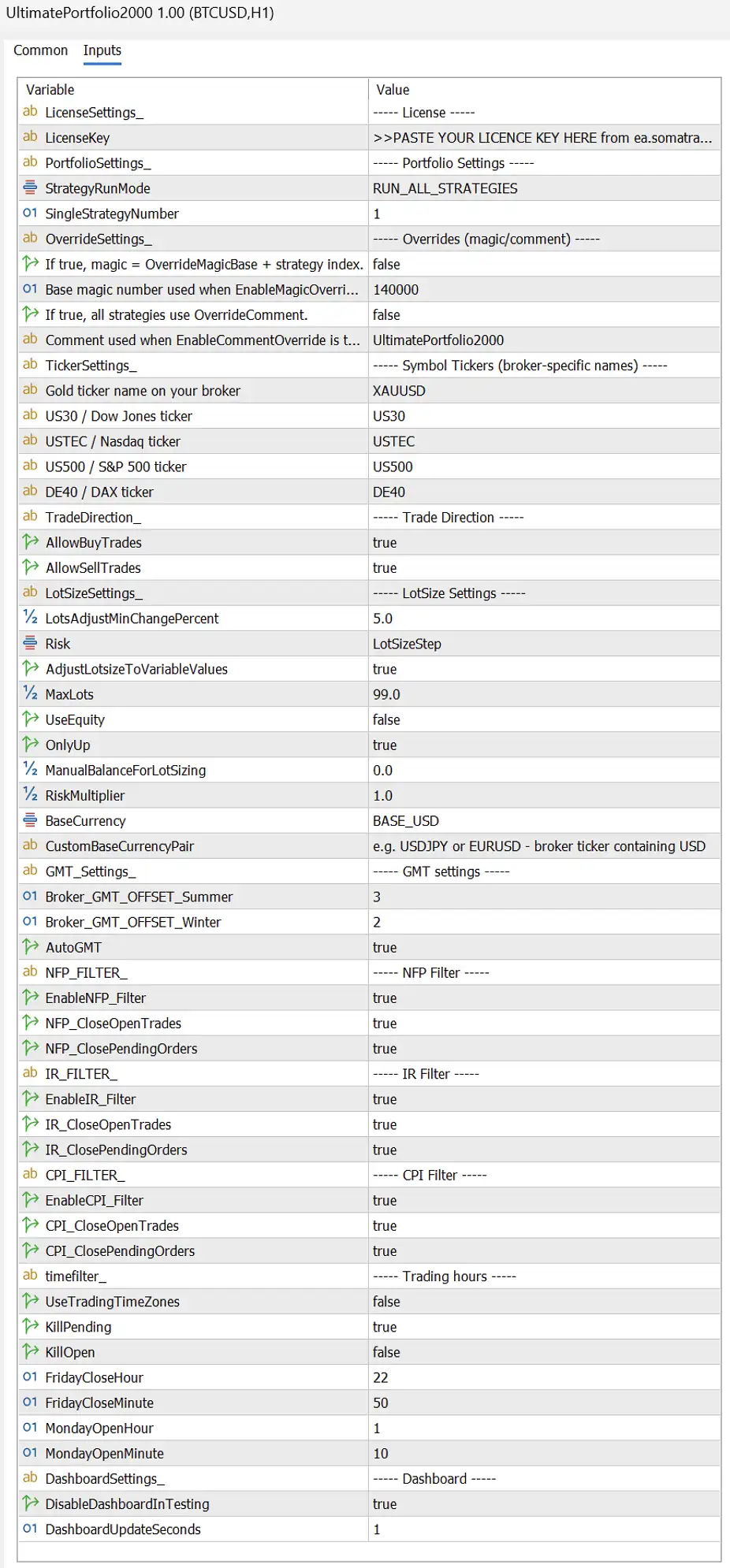
The StrategiesToRun input allows users to specify strategies through a comma-separated list of portfolio indexes. These indexes represent the strategy’s position in the portfolio load order, not a portion of its magic number.
For example, portfolio strategy #8 corresponds to magic number 8008, associated with The Gold Reaper. The portfolio index and magic number are different identifiers and should not be confused.
The EA also supports global magic-number overrides and a shared trade-comment override, providing additional flexibility for trade organization and account management.
Important: Before removing a strategy from StrategiesToRun, close or flatten its open trades to avoid leaving positions unmanaged by the intended portfolio configuration.
Multi-Asset Coverage: Gold and Major Index CFDs
Ultimate Portfolio 2000 EA MT5 extends beyond Gold trading by supporting five instrument categories:
- XAUUSD: Gold
- US30: Dow Jones index CFD
- US500: S&P 500 index CFD
- USTEC: Nasdaq-100 index CFD
- DE40: Germany 40 index CFD
This combination allows traders to configure Gold and index strategies within one EA rather than maintaining separate portfolio systems for each instrument.
Broker-Specific Symbol Mapping
Brokers may use different ticker formats for the same financial instrument. Ultimate Portfolio 2000 supports broker-specific symbol mapping so users can match the EA’s instrument settings to their broker’s naming conventions.
If a symbol input is left blank, the strategies assigned to that instrument are automatically disabled. This helps prevent the EA from attempting to trade a market that is unavailable on the selected account.
The EA also includes one-digit pip scaling support for index brokers, including configurations such as those used by RoboForex. This feature is designed to keep stop calculations and lot-sizing logic consistent with the broker’s pricing format.
As with any MT5 Expert Advisor, users should verify symbol names, contract specifications, tick values, minimum lot sizes, and trading conditions before running the system live.
Built-In US Economic News Filter
Major economic announcements can increase market volatility, widen spreads, and affect pending orders or open positions. Ultimate Portfolio 2000 includes an integrated US economic news filter to help users define how strategies behave around selected high-impact events.
The filter covers three event categories:
- NFP: Non-Farm Payrolls
- CPI: Consumer Price Index
- IR/FOMC: Interest-rate decisions and Federal Open Market Committee rate announcements
For each strategy, users can configure the number of minutes before and after an event during which news-related restrictions apply.
Depending on the settings, the EA can:
- Block new trade entries.
- Cancel existing pending orders.
- Close open positions.
These actions can be configured around the relevant event windows, allowing different strategies to use different news-protection rules.
Broker Time and Event Classification
The EA supports manual broker GMT configuration or automatic detection, helping align news windows with broker server time.
Its event classification also excludes certain commonly confused announcements. For example, ADP Nonfarm Employment is not classified as NFP, while FOMC speeches and meeting minutes are not treated as IR events under the described filtering logic.
These distinctions help make the event filter more targeted. However, news filtering does not eliminate slippage, unexpected volatility, spread expansion, or losses during economic announcements.
Advanced Risk Management and Automated Lot Sizing
Effective position sizing is an important part of running a multi-strategy trading portfolio. Ultimate Portfolio 2000 provides two main lot-sizing modes to accommodate different account-management approaches.
1. Manual Lot Size
Manual mode uses a fixed lot size configured by the user. It offers direct control over trade volume but does not automatically scale position size with account capital.
2. Lot per Balance Step
Automatic sizing adjusts trade volume according to account capital and the configured balance step. Position sizing is calculated per strategy, allowing the portfolio to scale its trading volume based on its settings.
Additional controls provide more detailed management of risk and exposure.
Global Risk Multiplier: Adjusts the configured risk or lot-sizing scale across the portfolio.
Maximum Lot Cap (MaxLots): Sets an optional upper limit on lot size. The default value of 0 means the EA does not apply an additional EA-level cap, although broker restrictions still apply.
Balance or Equity Sizing Base: Select whether lot sizing uses account balance or equity as its capital reference.
Base Currency Configuration: Supports USD, EUR, GBP, HKD, SGD, or a custom currency pair for more consistent sizing on non-USD accounts.
OnlyUp Capital Tracking
The optional OnlyUp feature is designed to increase lot sizing as peak capital rises without automatically reducing the sizing baseline during trading drawdowns.
Deposits can raise the tracked capital peak, while withdrawals reduce it. The EA also synchronizes the peak and rebalances pending-order lots following these cash-flow changes.
At startup, it can use recent closed-trade history to establish a historical peak, with a configurable lookback window and cash-flow-aware calculations. This is intended to provide a more meaningful starting baseline than resetting the peak to zero after every restart.
Because this feature can maintain elevated lot sizes after a drawdown, it should be evaluated carefully against the account’s risk tolerance and available margin.
Margin Call Protection
Optional Margin Call Protection (MCP) helps manage margin usage by accounting for same-side pending orders and limiting lot size according to a configured margin budget.
The MCP Risk Multiplier scales the risk applied to the lot size calculated by the margin protection system. A value of 1.0 uses the MCP-calculated size without an additional multiplier.
These tools provide more control over exposure, but they cannot guarantee that margin calls or stop-outs will be avoided during rapid price movements or adverse market conditions.
Flexible Trading Hours and Session Management
Ultimate Portfolio 2000 supports both portfolio-wide and strategy-specific trading windows.
Global Weekly Trading Window
Users can configure a general trading schedule based on the Monday market open and Friday market close. This helps define when the EA is permitted to trade during the trading week.
Individual Strategy Sessions
Each strategy can also use its own daily trading session. This is particularly useful for index strategies, where users may wish to restrict activity to specific market hours.
Outside the permitted trading windows, users can choose whether the EA should cancel pending orders, close open positions, or apply the configured restrictions.
These controls make it possible to align trading activity with a preferred schedule, broker conditions, or account rules. Settings should be checked carefully because closing positions outside a session can change the portfolio’s overall risk and exit behavior.
Optional Prop Firm Compliance Features
Ultimate Portfolio 2000 includes an optional Prop Firm Compliance layer, disabled by default. It provides additional controls that may help users configure the EA around selected proprietary trading firm rules.
Available features include:
- Maximum daily drawdown lockout: Restricts further trading when the configured daily drawdown limit is reached.
- No-hedge rule: Supports configurations designed to prevent hedging across the strategies running on the chart.
- Pending-order cap: Limits pending-order usage across the active portfolio.
- Per-symbol entry and exit randomization: Applies an optional random pip offset to configured entry and exit parameters for Gold, US30, USTEC, US500, and DE40.
Randomization settings can be configured independently for each supported symbol through the relevant MaxRandomizationPips_* inputs.
The compliance layer can be configured for different rule sets, including those associated with firms such as FTMO, FundedNext, and The5ers. However, using these options does not guarantee compliance or approval. Traders must independently verify each firm’s current rules, account-specific restrictions, drawdown calculations, news policies, and position-management requirements.
Live On-Chart Trading Dashboard
The Ultimate Portfolio 2000 MT5 dashboard provides a consolidated view of portfolio activity and account conditions. It helps users monitor multiple strategies and symbols from a single interface.
Dashboard information includes:
- License status and active portfolio configuration
- Lot-sizing method, sizing base, and effective capital
- Pending orders and open positions, separated by Buy and Sell and organized by symbol
- Floating profit and loss
- Today’s closed profit and loss
- All-time closed profit and loss
- Balance and equity drawdown in absolute values and percentages
- Trading costs, including slippage, swap, and commission
- Trading-cost summaries for the last 1, 7, 30, and 90 days, plus all available history
- Pending-order usage and broker limitations
- Current spread and active strategy count
- Upcoming and previous NFP, CPI, and IR/FOMC events
The compact dashboard is designed to make it easier to review trading activity without switching between numerous charts. It can also be disabled in the Strategy Tester to improve testing performance.
Trade Exit Management
Ultimate Portfolio 2000 supports layered exit management to help users define how trades are managed after entry. Available mechanisms include:
- Stop-loss
- Take-profit
- Break-even management
- Trailing-stop logic
Individual strategies can use their own exit parameters, allowing different configurations to operate within the same portfolio.
These mechanisms help structure trade management, but they do not guarantee profitable exits. Actual results depend on market behavior, execution quality, spreads, commissions, slippage, and the parameters used.
How to Set Up Ultimate Portfolio 2000 EA MT5
Follow these general steps to prepare the EA for testing or live deployment.
- Install the Expert Advisor: Place the EA in the appropriate MetaTrader 5 Experts directory and compile it if required.
- Attach it to a chart: Open a suitable chart in MT5 and attach Ultimate Portfolio 2000.
- Configure symbol mapping: Match XAUUSD, US30, US500, USTEC, and DE40 to the ticker names offered by your broker.
- Choose your portfolio mode: Run all available strategies or specify selected portfolio indexes in StrategiesToRun.
- Set lot sizing and risk limits: Review the sizing mode, risk multiplier, MaxLots, capital reference, and margin protection settings.
- Configure news and trading windows: Check broker GMT settings, event restrictions, and permitted trading sessions.
- Review optional compliance controls: Enable and configure the relevant prop firm restrictions only after checking the current rules that apply to your account.
- Test before live trading: Use the Strategy Tester and a demo account to examine execution, drawdown, trading costs, and interactions among strategies.
For a multi-symbol EA, confirm that the broker’s symbols and market data are available and that the relevant markets are enabled. A VPS may also be useful when continuous operation is required, although reliable hosting cannot remove market or execution risk.
Why Consider Ultimate Portfolio 2000 EA MT5?
Ultimate Portfolio 2000 is designed for traders who want to manage a configurable multi-strategy breakout system through one MetaTrader 5 Expert Advisor.
Its main features include:
- 41 pre-configured strategies in one EA
- Coverage of Gold and four major index CFDs
- Independent strategy settings and magic numbers
- Full-portfolio and single-strategy execution modes
- Broker-specific symbol mapping
- Manual and automatic lot-sizing options
- Optional OnlyUp capital tracking and Margin Call Protection
- Configurable NFP, CPI, and FOMC-related news filtering
- Global and per-strategy trading schedules
- Optional prop firm compliance controls
- Layered stop-loss, take-profit, break-even, and trailing exits
- A detailed dashboard with per-symbol positions, profit and loss, drawdown, trading costs, and news information
Combining these functions in a single system can simplify portfolio administration compared with managing many independent EAs. Nevertheless, a larger strategy count does not automatically mean lower risk or better performance. Strategies can experience correlated losses, especially during broad market moves or periods of unusual volatility.
Final Overview
Ultimate Portfolio 2000 EA MT5 is a multi-asset, multi-strategy breakout trading robot built for traders who want configurable automated trading across Gold, US30, US500, USTEC, and DE40.
Its 41-strategy portfolio, independent strategy configurations, flexible position sizing, economic news filter, trading-session controls, optional prop firm features, and live monitoring dashboard provide a comprehensive set of tools for portfolio management on MetaTrader 5.
For the most responsible approach, begin with historical testing and demo trading, verify all broker-specific settings, and evaluate the complete portfolio as well as individual strategies. Pay particular attention to drawdown, correlated exposure, trading costs, margin requirements, and the rules of any funded account.
Risk Disclaimer: Automated trading involves substantial risk. Past performance and backtest results do not guarantee future results. CFDs and leveraged products can cause significant losses, and no Expert Advisor can guarantee profits, prevent drawdowns, or ensure compliance with every broker or proprietary trading firm’s rules. Use appropriate risk controls and trade only with capital you can afford to lose.













Reviews
There are no reviews yet.