 English
 فارسی
فارسی


OilVector X MT5 – Automated WTI Crude Oil Trading EA for MetaTrader 5
What Is OilVector X MT5?
OilVector X MT5 is an automated Expert Advisor designed specifically for WTI Crude Oil trading on MetaTrader 5. The system uses a daily breakout approach to identify potential momentum opportunities in the oil market while applying predefined trade management rules.
The EA is designed as a plug-and-play WTI trading system, allowing users to attach it to the appropriate crude oil symbol, select their preferred risk parameters, and start testing without extensive manual configuration.
Depending on the broker, WTI Crude Oil may be listed under symbols such as XTIUSD, USOUSD, WTI, or another broker-specific name.
Unlike recovery-based systems, OilVector X MT5 does not use Grid or Martingale techniques. Each position is opened with its own predefined risk management, including a Stop Loss and Take Profit.
Important: Automated trading involves substantial risk. Historical backtests and live results do not guarantee future performance.
Why Trade WTI Crude Oil With an Automated EA?
Crude oil can behave differently from many traditional forex and index markets. WTI prices can experience sharp movements in response to supply changes, economic conditions, geopolitical developments, inventory data, and other market events.
These characteristics can make automated oil trading challenging.
OilVector X MT5 is built around a daily breakout methodology, seeking to participate when price develops directional momentum rather than relying on grid recovery or progressively increasing exposure.
The strategy is designed to focus on periods when WTI establishes and breaks through important daily price levels.
How OilVector X MT5 Works
The core strategy of OilVector X MT5 is based on daily breakout levels.
The EA evaluates the market using its predefined breakout logic and can open trades when the required conditions are met. Each trade is managed according to predefined parameters rather than requiring manual intervention.
Key elements include:
- Daily breakout-based trading logic
- Individual Stop Loss on every trade
- Fixed Take Profit
- Break-even management
- Automated trade execution
- Risk-based position sizing
- Built-in performance statistics
- Real-time equity curve
- Optional Prop Firm Mode
The result is a structured automated approach to WTI Crude Oil trading on MetaTrader 5.
No Grid or Martingale Recovery
One of the important characteristics of OilVector X MT5 is its trade management structure.
The EA does not rely on:
- Grid trading
- Martingale lot increases
- Recovery baskets
- Progressive averaging strategies
Every position has its own Stop Loss from the moment it is opened.
This structure allows traders to evaluate individual trade risk more clearly and avoids the potentially escalating exposure associated with recovery-based systems.
However, the absence of Grid or Martingale does not eliminate trading risk. Breakout strategies can experience losing trades and losing streaks, particularly during periods of ranging or highly irregular market behavior.
Break-Even Trade Management
OilVector X MT5 also includes break-even management designed to react when market momentum changes.
The break-even level can be moved relatively quickly according to the strategy’s rules, helping manage open positions after favorable price movement.
As with any automated exit mechanism, actual execution can be affected by market conditions, spread, slippage, liquidity, and broker execution.
Purpose-Built for WTI Crude Oil
OilVector X MT5 is specifically designed for the WTI Crude Oil market rather than being a generic multi-asset EA.
Depending on the broker, traders may find WTI under different symbol names, including:
- XTIUSD
- USOUSD
- WTI
- Other broker-specific crude oil symbols
Users should always select the correct WTI symbol provided by their broker.
Because trading conditions can vary significantly between brokers, the same EA settings or historical results should not automatically be assumed to apply equally across every broker.
Broker Sensitivity
OilVector X MT5 is broker sensitive, particularly because crude oil trading conditions can vary between brokers.
Important differences may include:
- Spread
- Swap
- Contract specifications
- Trading hours
- Tick data
- Execution speed
- Slippage
- Commission structure
- Symbol specifications
- Margin requirements
The source methodology recommends testing the EA with brokers offering suitable WTI trading conditions, including Darwinex and IC Markets/IC Trading as examples.
However, broker suitability should always be evaluated independently using current trading conditions and your own testing.
OilVector X MT5 Prop Firm Mode
OilVector X MT5 includes a dedicated Prop Firm Mode designed to provide additional account-level risk controls for traders working with evaluation or funded-account rules.
Available controls include:
Maximum Daily Loss
The EA can stop opening new trades after the configured daily loss threshold has been reached.
Maximum Total Loss
A total loss limit can be defined based on the EA’s starting account balance.
Optional Maximum Daily Profit
Users can optionally configure a daily profit threshold to stop further trading after reaching the selected target.
This can be useful for traders who want to limit additional exposure after a successful trading session.
Randomized Entry, Stop Loss and Take Profit
Configurable randomization of entry, SL, and TP levels can introduce small variations within defined ranges.
This feature is intended to reduce the correlation that can occur when multiple accounts operate the same EA configuration.
Reset State
The Reset State function allows saved Prop Firm Mode tracking information to be cleared when beginning a new evaluation or account cycle.
Real-Time Trading Dashboard
OilVector X MT5 includes a detailed on-chart dashboard that provides trading and account information directly inside MetaTrader 5.
The dashboard can display statistics and an equity curve without requiring an external tracking service.
This means traders can monitor key information directly from the MT5 chart rather than relying exclusively on third-party platforms.
The EA also uses persistent state information, allowing relevant dashboard data to survive EA removal or MetaTrader terminal restarts.
Plug-and-Play Setup
OilVector X MT5 is designed to keep installation straightforward.
The general setup process is:
- Install the EA in MetaTrader 5.
- Open your broker’s WTI Crude Oil chart.
- Select the correct symbol, such as XTIUSD, USOUSD, or WTI.
- Attach OilVector X MT5 to the chart.
- Select the appropriate risk and lot-sizing parameters.
- Review the EA inputs and broker conditions.
- Test the configuration on a demo account before considering live deployment.
The strategy’s timing is not dependent on the chart timeframe in the usual way. The engine includes a timer-driven fallback designed to help the EA continue operating even when live ticks are temporarily unavailable.
Recommended VPS Operation
For traders using automated execution, a VPS (Virtual Private Server) can help maintain continuous MetaTrader 5 operation.
Running OilVector X MT5 on a VPS can reduce the risk of interruptions caused by:
- Computer shutdowns
- Internet disconnections
- Terminal closures
- Local power interruptions
A VPS does not eliminate broker-side execution risks, but it can provide a more consistent environment for an automated Expert Advisor.
How to Backtest OilVector X MT5
Proper backtesting is an important part of evaluating any automated trading strategy.
For OilVector X MT5, the recommended testing process includes:
1. Select the Correct WTI Symbol
Choose the WTI Crude Oil symbol provided by your broker. Examples include XTIUSD, USOUSD, or WTI.
2. Use Real Ticks
Where available, use the Every Tick Based on Real Ticks testing method in MetaTrader 5 for a more detailed historical simulation.
3. Test an Appropriate Account Size
The source material recommends testing with a deposit of $1,000 or higher, while also noting that appropriate account size depends on the selected risk and lot-sizing configuration.
Smaller accounts may require more conservative risk settings.
4. Test a Long Historical Period
The recommended historical testing window begins in 2018 and extends through the available data.
Longer test periods can help reveal how the strategy behaves across different market environments.
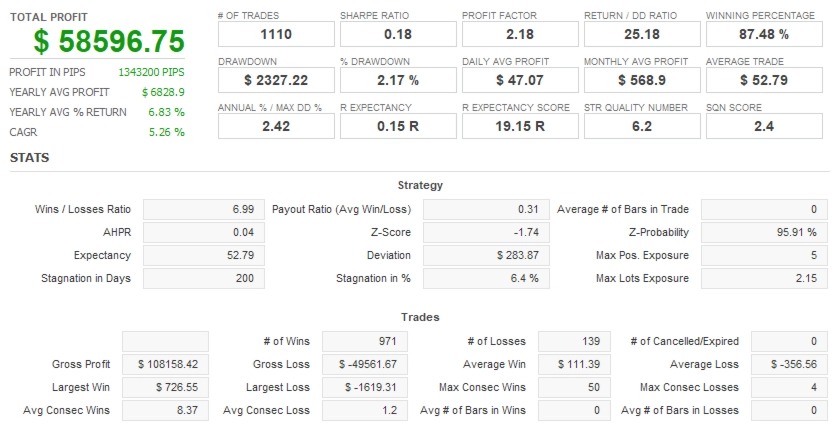
5. Evaluate More Than Profit
A quality backtest should not be judged by net profit alone.
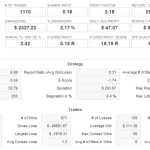
Important metrics include:
- Recovery Factor
- Sharpe Ratio
- Maximum Drawdown
- Profit Factor
- Number of trades
- Average trade
- Losing streaks
- Equity curve stability
- Maximum exposure
Recovery Factor can be particularly useful when comparing overall return against drawdown.
Development and Validation Methodology
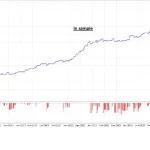
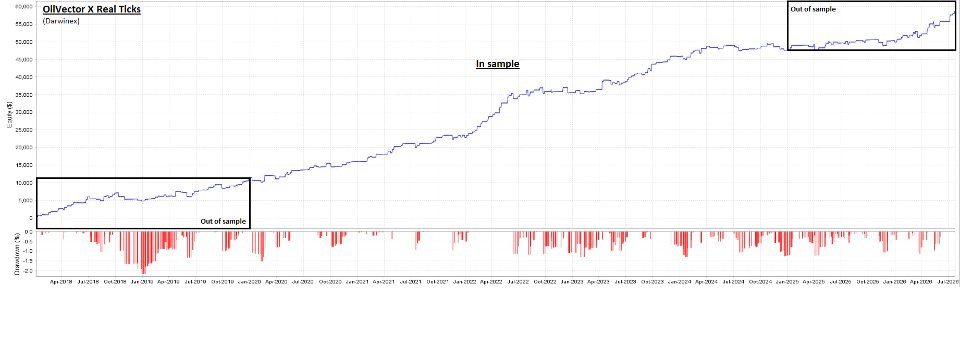
OilVector X MT5 was developed and evaluated using Darwinex real tick data, with historical data divided into development and validation periods.
The stated methodology uses:
- In-sample development/optimization: 2020–2024
- Out-of-sample validation: 2018–2020
- Out-of-sample validation: 2024–July 2026
Using out-of-sample periods on both sides of the optimization window provides an additional way to examine whether the strategy’s logic behaves consistently on data that was not used for its development.
This does not eliminate overfitting or guarantee future results, but it provides a more structured framework for evaluating historical robustness.
Key Features of OilVector X MT5
OilVector X MT5 combines several features for automated WTI Crude Oil trading:
- Purpose-built for WTI Crude Oil
- MetaTrader 5 compatibility
- Daily breakout trading strategy
- Plug-and-play configuration
- Individual Stop Loss on every trade
- Fixed Take Profit
- Break-even trade management
- No Grid recovery
- No Martingale recovery
- Prop Firm Mode
- Maximum Daily Loss control
- Maximum Total Loss control
- Optional Maximum Daily Profit
- Entry, SL and TP randomization
- On-chart statistics dashboard
- Live equity curve
- Persistent state management
- Timer-driven execution fallback
- VPS-friendly operation
Who Is OilVector X MT5 For?
OilVector X MT5 may be suitable for traders who are interested in:
- Automated WTI Crude Oil trading
- Daily breakout strategies
- MetaTrader 5 Expert Advisors
- Rule-based commodity trading
- Automated risk management
- Prop firm-oriented trading controls
- Non-Martingale trading systems
- Non-Grid trading systems
- VPS-based automated trading
It can also be useful for traders who want to monitor their EA’s statistics and equity curve directly inside MetaTrader 5.
However, users should understand the characteristics of oil markets and the risks associated with automated trading before deploying the EA on a live account.
Risk and Account Management
OilVector X MT5 is not a zero-drawdown system.
Even a structured breakout strategy can experience:
- Losing trades
- Consecutive losses
- False breakouts
- High-volatility periods
- Spread expansion
- Slippage
- Execution differences
- Drawdowns
The appropriate account size depends on the selected risk percentage, lot-sizing method, broker conditions, and individual risk tolerance.
For smaller accounts, conservative risk settings may be more appropriate.
Before live deployment, traders should evaluate the EA using realistic broker data and consider both historical drawdown and potential adverse market conditions.
Final Overview
OilVector X MT5 is an automated MetaTrader 5 Expert Advisor focused specifically on WTI Crude Oil trading.
Its core methodology uses daily breakout levels combined with predefined Stop Loss and Take Profit rules, while avoiding Grid and Martingale recovery techniques. The EA also provides Prop Firm Mode, automated risk controls, an on-chart statistics dashboard, equity tracking, and persistent state management.
For traders looking for an automated WTI Crude Oil breakout EA for MT5, OilVector X MT5 offers a structured framework that can be tested across historical data and demo environments before live use.
As with any automated trading system, performance depends on market conditions, broker execution, spreads, slippage, risk settings, and other external factors. Thorough backtesting, forward testing, and disciplined risk management are essential.
Risk Disclaimer
Trading crude oil and other leveraged financial instruments involves substantial risk and may result in significant losses. Historical backtests, out-of-sample results, simulated performance, and previous live performance do not guarantee future results. OilVector X MT5 does not eliminate market risk, drawdown, slippage, spread expansion, liquidity risk, or broker execution risk.
Users should test the EA on a demo account, use appropriate risk parameters, verify their broker’s WTI contract specifications and trading conditions, and only trade capital they can afford to lose.












Reviews
There are no reviews yet.