 English
 فارسی












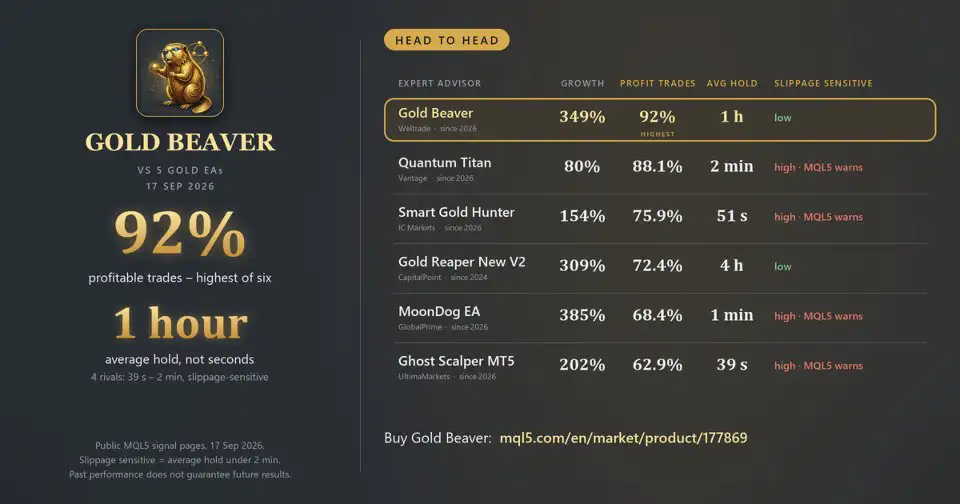

GOLD BEAVER MT5 Source Code – Automated XAUUSD Trading EA with 13 Strategy Presets
Introduction to GOLD BEAVER MT5
GOLD BEAVER MT5 is an automated Expert Advisor developed for trading Gold against the US Dollar (XAUUSD) on the MetaTrader 5 platform. Designed with flexibility in mind, it can be attached to an XAUUSD chart on any timeframe, while its trading signals are evaluated at M15 candle boundaries.
The EA comes with Combo Safe as its default preset, allowing users to begin with the recommended configuration without having to choose from all available strategies immediately. For traders who want more control, GOLD BEAVER MT5 provides 13 individual strategy presets, performance comparison tools, equity analysis, and exposure-smoothing options.
Its trading structure avoids Martingale, Grid, and Averaging strategies. Each position is assigned a Stop Loss when it opens, providing a predefined exit level as part of its trade management approach.
GOLD BEAVER MT5 is not designed for high-frequency trading (HFT). Since its signals are evaluated at M15 candle boundaries, it does not require a specialized low-latency VPS or co-location setup. The developer also states that the EA can be tested using the MT5 Strategy Tester in 1-minute OHLC mode.
Key Features of GOLD BEAVER MT5
1. 13 Trading Presets in One Expert Advisor
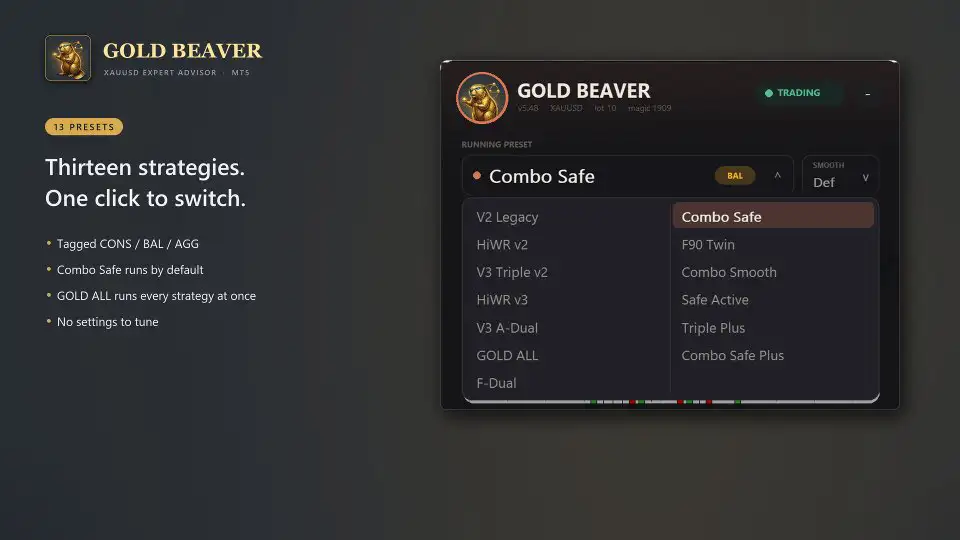
GOLD BEAVER MT5 includes 13 individual presets, organized into three trading profiles: CONS, BAL, and AGG. This structure allows traders to select a configuration that matches their preferred level of trading activity and exposure.
The EA also includes a GOLD ALL option, which runs every strategy simultaneously.
Rather than requiring separate Expert Advisors for different approaches, users can access the available presets from one MT5 trading tool.
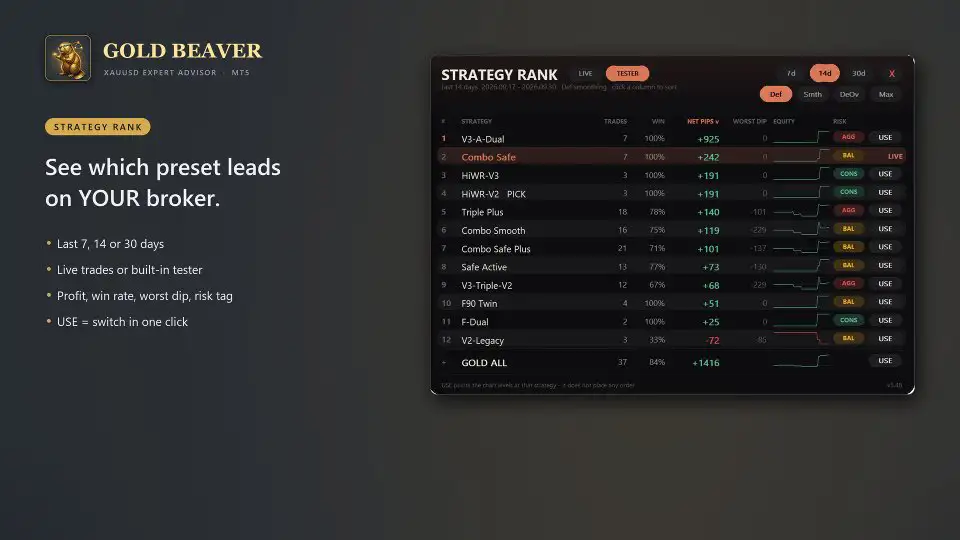
2. Strategy Rank – Compare Presets on Your Broker
The built-in Strategy Rank feature helps users compare the available presets using performance data from their own broker.
It can evaluate presets over three selectable historical periods:
- Last 7 days
- Last 14 days
- Last 30 days
The comparison can use live trading data or the built-in tester. Once a preferred preset has been identified, users can press USE to switch to it with one click.
This feature provides a way to review how different configurations have behaved under the user’s broker conditions instead of relying exclusively on results from another trading environment.
Historical rankings do not predict future performance. Results may vary with market conditions, spreads, commissions, and execution quality.
3. Equity View and Performance Analysis
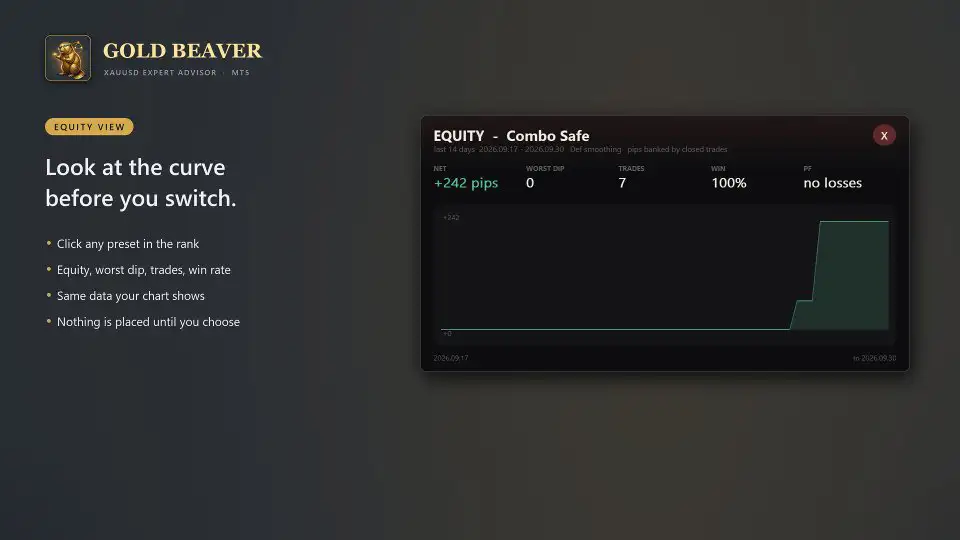
Before changing presets, users can select a strategy to view its equity curve and key trading statistics.
The equity view includes information such as:
- Equity curve
- Largest recorded decline or worst dip
- Number of trades
- Win rate
These metrics help users examine the historical behavior of individual presets before selecting one.
A high win rate or smooth historical equity curve does not necessarily indicate future profitability. Results should be assessed alongside drawdown, trade frequency, position size, and potential losses.
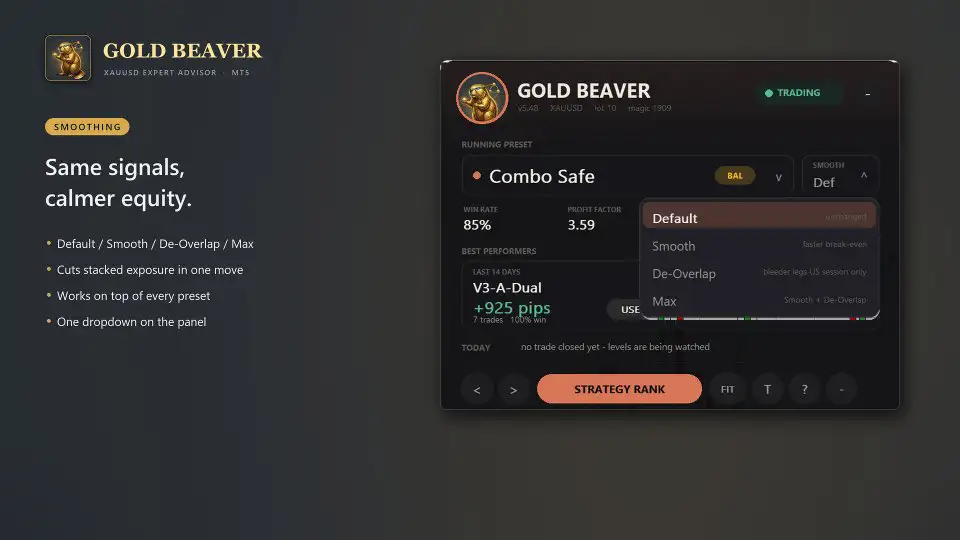
4. Smoothing Options for Exposure Management
GOLD BEAVER MT5 provides four smoothing modes:
- Default
- Smooth
- De-Overlap
- Max
These options are designed to work with the same underlying signals while reducing overlapping or stacked exposure. Smoothing can be applied on top of any preset, giving users another way to adjust how strategies operate.
Smoothing changes exposure behavior; it does not eliminate market risk or guarantee a smoother live equity curve.
5. Prop Firm Guard – Configurable Loss Limits
The built-in Prop Firm Guard provides two configurable risk-control thresholds:
- Daily loss limit, expressed as a percentage.
- Maximum loss limit, expressed as a percentage.
The feature is disabled by default and can be activated according to the user’s preferred settings. The available controls also include an option to close all trades if a configured limit is breached.
For example, a trader might configure a 4% daily loss threshold and a 10% maximum loss threshold. These are illustrative settings, not universal recommendations or guarantees of compliance with any prop firm’s rules.
Prop firm requirements differ. Before using the EA in an evaluation or funded account, check the firm’s rules regarding drawdown calculations, equity limits, automated trading, and permitted risk-management methods.
6. Restart-Safe Operation
GOLD BEAVER MT5 is designed to recover its trading state after the EA is reattached following a platform restart or VPS migration.
According to the product description, it rebuilds information about existing open orders and pending levels when it starts again.
This functionality is intended to help the EA resume operation without relying solely on information retained during its previous running session. Nevertheless, users should verify the EA’s status and open trades after any restart or migration.
7. Lot Sizing for Different Account Currencies
The EA supports lot-size calculations for accounts using different base currencies, including:
- USD
- EUR
- GBP
- JPY
- AED
- AUD
- Other supported account currencies
Users can choose between a fixed lot size and a floating lot configuration that scales with account balance.
A maximum spread filter is also available as part of the lot and risk settings.
On smaller accounts, the broker’s minimum permitted volume may be 0.01 lots. If the EA has to use the broker minimum instead of a smaller calculated volume, the actual exposure per trade may be higher than intended. Traders should check the suggested lot size displayed by the panel and ensure that their balance can accommodate the associated risk.
8. 11 Chart Color Themes
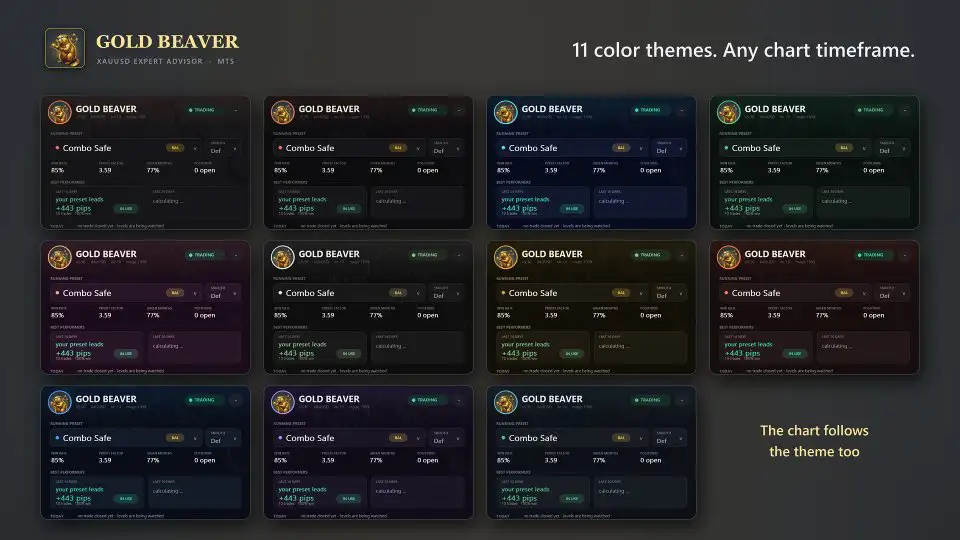
GOLD BEAVER MT5 includes 11 visual themes. The chart colors adapt to the selected theme, allowing users to personalize the EA’s appearance.
The interface settings also include controls for displaying or hiding the panel and showing trade profit labels.
9. Multi-Chart Support and Local Operation
The EA is designed for use across multiple charts, with each chart receiving its own Magic Number.
The developer states that GOLD BEAVER MT5 does not require DLL files or external services, and that its operation remains within the MetaTrader 5 terminal.
This design is intended to simplify deployment and avoid dependencies on additional external software.
GOLD BEAVER MT5 Presets Explained
The 13 presets are divided into three profiles, with an additional GOLD ALL mode.
CONS
- Included Presets: HiWR-V3, HiWR-V2, F-Dual
- Intended Trading Style: Fewer trades, with an emphasis on a higher historical win rate
BAL
- Included Presets: Combo Safe, Combo Safe Plus, Combo Smooth, Safe Active, F90 Twin, V2-Legacy
- Intended Trading Style: Moderate trading activity and a balanced historical equity profile
AGG
- Included Presets: V3-Triple-V2, V3-A-Dual, Triple Plus
- Intended Trading Style: More trading activity and potentially larger equity fluctuations
ALL
- Included Presets: GOLD ALL
- Intended Trading Style: Runs every strategy simultaneously
The profile names describe the intended characteristics of the presets, not guaranteed outcomes. Actual trading frequency, drawdown, and profitability depend on market conditions and execution.
Which GOLD BEAVER MT5 Preset Should You Choose?
The appropriate preset depends on your trading objectives, risk tolerance, and evaluation results.
Here is the developer’s suggested starting guidance:
- For new users: Start by examining Combo Safe, the default preset.
- For prop firm challenges: Consider Combo Safe or HiWR-V3 and review the Prop Firm Guard settings. Example thresholds include 4% daily loss and 10% maximum loss.
- For a smoother historical equity profile: Evaluate Combo Safe Plus or Combo Smooth, potentially using the Smooth mode.
- For more trading activity: Review Safe Active or Triple Plus.
- For users willing to accept larger equity fluctuations: Examine V3-Triple-V2 or V3-A-Dual.
- When uncertain: Use Strategy Rank to compare the presets over the available historical periods on your own broker.
These are selection guidelines rather than performance guarantees. A preset that ranked well over the previous 7, 14, or 30 days may behave differently in the future.
GOLD BEAVER MT5 Input Settings
The EA organizes its main controls into four groups to make configuration more straightforward.
- Strategy: Preset selection and base Magic Number
- Lot & Risk: Fixed lot or floating lot based on balance, plus maximum spread filter
- Prop Firm Guard: Daily loss percentage, maximum loss percentage, and close-all option when a limit is breached
- UI: Panel visibility, color theme, and trade profit labels
The controls allow users to select a strategy, configure position sizing, establish optional loss thresholds, and personalize the chart interface.
Before running the EA, review all inputs carefully. In particular, check the lot-size mode, broker minimum volume, maximum spread setting, Magic Number, and Prop Firm Guard configuration.
Recommended Trading Setup
The developer provides the following general setup guidance:
- Expert Advisor: GOLD BEAVER MT5
- Trading Symbol: XAUUSD (Gold)
- Chart Timeframe: Any timeframe supported by the EA
- Signal Evaluation: M15 candle boundaries
- Default Preset: Combo Safe
- Connection: Any stable internet connection
- Trading Platform: MetaTrader 5
Account Balance and Position Size
The EA’s panel displays a suggested lot size based on the account balance and selected preset.
On smaller accounts, the EA may use the broker’s minimum trade volume, such as 0.01 lots. This can result in greater exposure per trade than a smaller calculated position would have created.
For this reason, do not select an account balance based only on the minimum deposit accepted by a broker. Consider the suggested lot size, Stop Loss distance, contract specifications, margin requirements, and the amount you can afford to risk.
Connection and VPS Requirements
GOLD BEAVER MT5 is not an HFT system. Its signals are evaluated at M15 candle boundaries rather than relying on extremely fast execution or tick-by-tick latency advantages.
According to the developer, a specialized low-latency VPS or co-location service is not required. A stable connection is still important for maintaining platform access and allowing the EA to operate as intended.
Backtesting GOLD BEAVER MT5
Testing the EA under different market conditions is an important step before using it with real capital.
The product description states that its strategies were developed using a custom Python research engine operating separately from the MT5 Strategy Tester. The developer reports that the strategies were evaluated across market periods from 2020 to 2026 and were not simply tuned to one favorable year.
For testing in MetaTrader 5, two modes are suggested:
1. 1-Minute OHLC Mode
The MT5 Strategy Tester can be run using 1 Minute OHLC mode for faster testing.
This mode is useful for preliminary strategy comparisons, but it does not reproduce every intrabar price movement.
2. Every Tick Based on Real Ticks
For a more detailed simulation, use Every Tick Based on Real Ticks.
This mode uses historical tick data and can provide a closer approximation of live price movement, although it still cannot perfectly reproduce future execution conditions.
3. Test with Your Own Broker’s XAUUSD Data
Whenever possible, run tests using historical XAUUSD data from the broker you intend to use.
Broker-specific spreads, commissions, contract specifications, and execution conditions can affect results. A preset that performs differently on one broker may produce different results on another.
Backtesting is a research tool, not a guarantee of future performance. Live trading may differ because of changing market conditions, execution delays, slippage, and other trading costs.
Is GOLD BEAVER MT5 Suitable for Your Trading Approach?
GOLD BEAVER MT5 may be worth evaluating if you want an automated gold trading EA that offers:
- 13 strategy presets within one Expert Advisor.
- CONS, BAL, and AGG trading profiles.
- A GOLD ALL mode for running all strategies.
- Strategy Rank for comparing presets on your broker.
- Equity curves and historical trading statistics.
- Four smoothing modes for managing overlapping exposure.
- Optional daily and maximum loss limits through Prop Firm Guard.
- Fixed or balance-based floating lot sizing.
- Support for multiple account currencies.
- Restart recovery for open orders and pending levels.
- 11 chart color themes.
- Multi-chart operation with separate Magic Numbers.
- No Martingale, Grid, or Averaging strategies.
- No DLLs or external services, according to the developer.
The EA’s range of presets and analysis tools provides several ways to examine and configure automated XAUUSD trading. However, the number of features does not remove the need for independent testing and careful risk management.
Final Overview
GOLD BEAVER MT5 is an automated XAUUSD Expert Advisor for MetaTrader 5, combining 13 trading presets with tools for strategy comparison, equity analysis, exposure smoothing, and optional prop firm loss controls.
Its default Combo Safe preset offers a starting configuration, while Strategy Rank allows users to compare different presets using historical data from their own broker. Additional features include fixed or floating lot sizing, restart-safe operation, multi-chart support, and 11 visual themes.
The EA is designed without Martingale, Grid, or Averaging and assigns a Stop Loss when each position opens. It is not an HFT system and does not require specialized low-latency infrastructure according to the developer.
Before using GOLD BEAVER MT5 with a live account, review its settings, test the presets with your broker’s XAUUSD data, and confirm that the selected configuration is appropriate for your available capital and risk tolerance.
Risk Disclaimer
Trading gold, Forex, and other leveraged financial instruments involves a substantial risk of loss. XAUUSD prices can move sharply, and automated trading does not eliminate market risk.
A Stop Loss does not guarantee that a position will close at the exact specified price. Gaps, slippage, low liquidity, spread changes, execution delays, and broker conditions can result in a different closing price or a larger-than-expected loss.
Historical backtests, Strategy Rank results, win rates, equity curves, and preset comparisons do not guarantee future performance. Results from the 2020–2026 research periods are historical research claims supplied by the developer and should be independently evaluated. The Prop Firm Guard is a configurable risk-control feature, not a guarantee against exceeding a firm’s drawdown limits or complying with all its trading rules.
The suggested lot size and account balance are not guarantees of capital protection. Floating lot calculations and broker minimum-volume restrictions can materially affect actual exposure.
GOLD BEAVER MT5 is trading software, not financial advice or a promise of investment returns. Test it thoroughly on a demo account, understand its settings, and seek advice from a qualified financial professional if needed. Only trade with funds you can afford to lose.
















Reviews
There are no reviews yet.