 English
 فارسی
فارسی

Aikon MT5 – AI-Powered Automated Trading and Conversational Control
Introduction
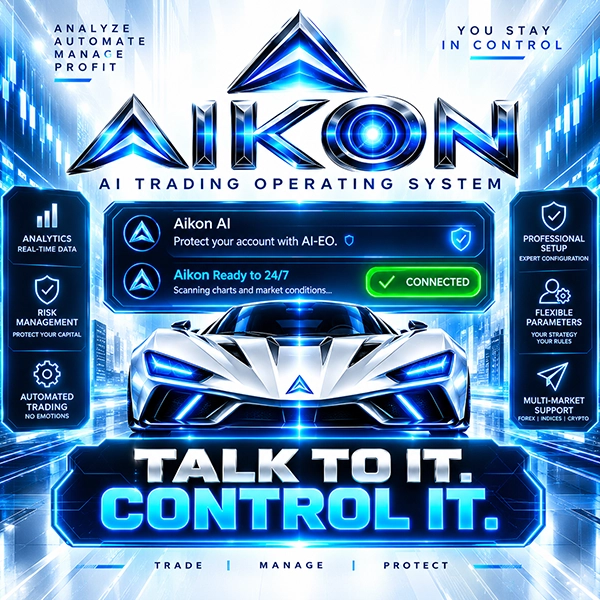
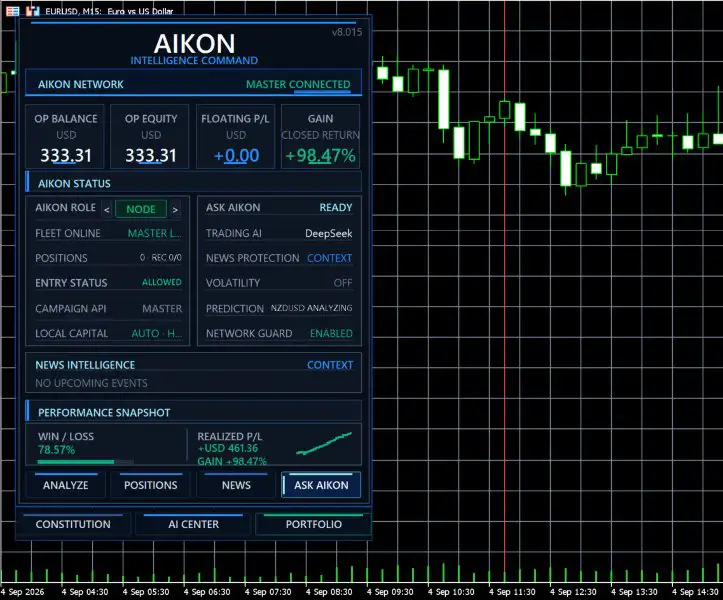
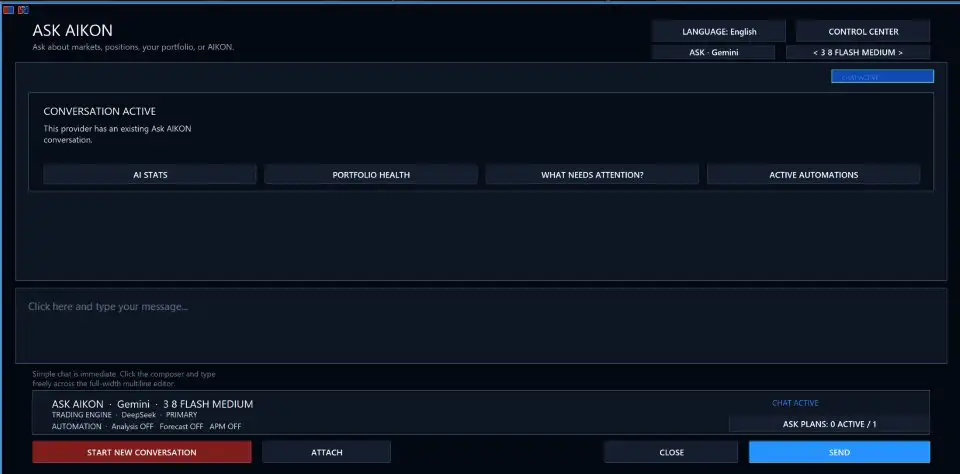
Aikon MT5 is an AI-powered Expert Advisor for MetaTrader 5 that combines automated trading with conversational control. Instead of relying exclusively on traditional menus and manual configuration, the system allows traders to interact with their trading environment using natural-language instructions through Ask Aikon.
Once configured and enabled, Aikon MT5 can analyze market conditions, open and manage trades, monitor positions, and operate according to the trading rules and risk controls selected by the user.
The system is designed around an important principle: automation should operate within clearly defined rules, while the trader remains in control of important decisions and operational changes.
Aikon MT5 can be used with individual accounts or connected account structures, while its conversational interface can also be accessed through Telegram on compatible setups.
Aikon MT5 at a Glance
- Product: Aikon MT5
- Platform: MetaTrader 5
- Core Technology: AI-Powered Trading Automation
- Control Interface: Ask Aikon
- Primary Markets: Forex and Gold
- Automated Execution: Yes
- Money Management: Yes
- Conversational Control: Yes
- Telegram Integration: Available
- Temporary Trading Plans: Supported
- Alerts & Monitoring: Supported
- Multi-Account Architecture: Supported
- Capital Allocation Controls: Supported
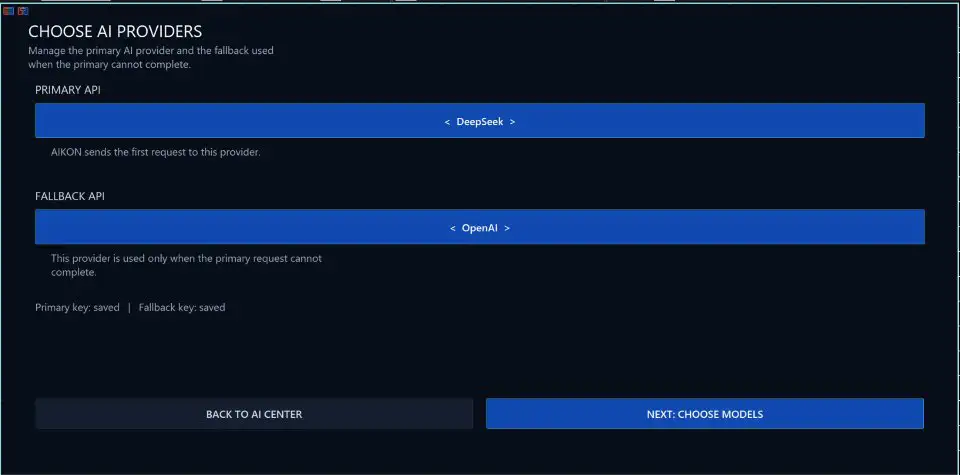
- AI Provider Selection: Supported
- Web Research: Available with compatible providers
- File-Based Context: Supported
- Backtesting: MetaTrader 5 Strategy Tester
What Is Aikon MT5?
Aikon MT5 is an automated trading Expert Advisor that combines algorithmic execution with an AI-based conversational interface.
Traditional Expert Advisors generally require traders to locate specific inputs, parameters, and settings within the MetaTrader interface. Aikon MT5 introduces another layer of interaction through Ask Aikon, allowing users to describe what they want in ordinary language.
For example, a trader can ask the system to:
- Explain a trading configuration
- Investigate why a market did not generate a trade
- Review account exposure
- Prepare a proposed configuration change
- Pause new trading
- Review open positions
- Create an alert
- Prepare a temporary monitoring plan
- Research market information
The important distinction is that conversational interaction does not mean unrestricted autonomous control. Requested operational changes are presented for review and confirmation before they are applied.
Ask Aikon – Conversational Control for Your Trading System
One of the defining features of Aikon MT5 is Ask Aikon.
Instead of searching through multiple settings screens, traders can describe their objective conversationally.
For example:
“Build me a Forex Single Entry setup with a Stop Loss and explain the settings before I confirm.”
Or:
“Why didn’t this market trade? Check what is blocking it.”
Or:
“Review my USD exposure and explain where I may be concentrated.”
This conversational approach is designed to make the trading system easier to understand and manage without removing the user’s control over important decisions.
When an operational change is requested, the system can prepare a proposal. The trader reviews the proposed action and confirms it before the system applies the change.
Automated Trading Under Your Rules
A key principle of Aikon MT5 is that routine automated trading can continue without requiring the trader to remain in an ongoing conversation.
After the system has been configured and enabled, the Expert Advisor operates according to the selected rules, trading settings, and risk controls.
This means traders do not have to manually approve every routine entry.
At the same time, important operational changes requested through Ask Aikon are designed to go through a review and confirmation process.
The result is a combination of:
- Automated execution
- User-defined rules
- Conversational interaction
- Confirmation-based operational changes
- Ongoing monitoring
Trading Profiles for Different Approaches
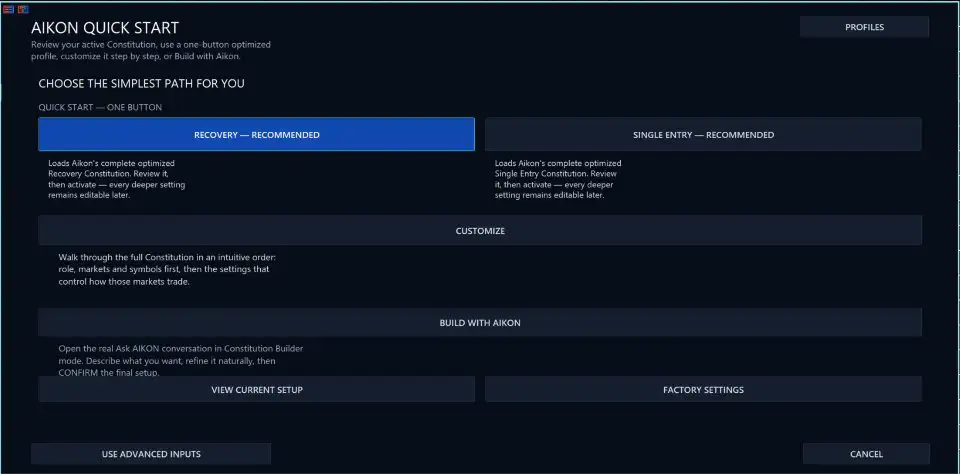
Aikon MT5 can start with different trading approaches depending on the user’s preferred strategy.
Forex Single Entry with Stop Loss
This profile is designed around individual Forex entries with configured exit protection.
Single Entry can support AI-driven or rule-based Take Profit and Stop Loss behavior depending on the selected configuration.
Gold Single Entry with Stop Loss
This profile provides a starting framework for automated Gold trading.
It can be used as a foundation for traders interested in automated XAUUSD strategies while maintaining configured exit and risk parameters.
Forex Recovery
Aikon MT5 also provides an optional Forex Recovery approach.
Recovery can add and manage positions according to its configured Recovery rules. Because recovery-based strategies can increase exposure during adverse market movement, traders should understand the relevant position-sizing and risk parameters before enabling this approach.
Recovery is optional.
AI-Managed Symbol Selection
Aikon MT5 allows traders to choose their preferred symbols or ask the system for recommendations.
The AIKON CHOOSES option can be used for ongoing AI-managed symbol selection, where supported by the configuration.
Different market classes can also use different trading settings when appropriate.
This provides flexibility for traders who want to operate with specific instruments while also having the option of broader AI-assisted market selection.
Capital Management
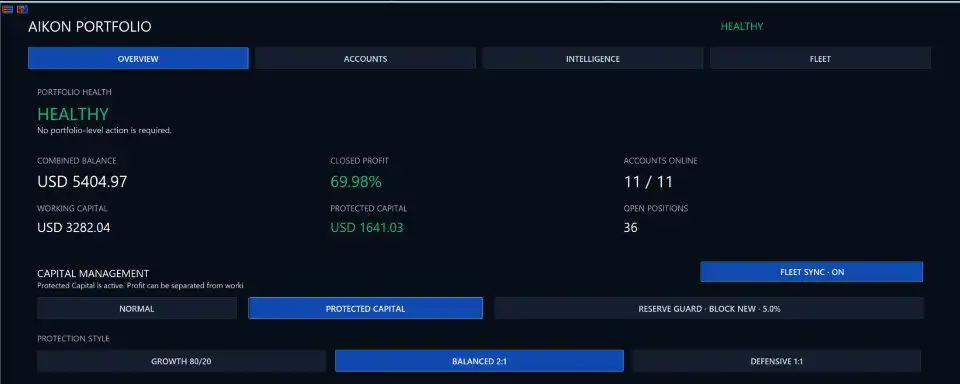
One of the more distinctive components of Aikon MT5 is its capital allocation framework.
Rather than treating all available account equity as automatically available for new trading activity, the system provides several conceptual capital categories.
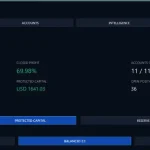
Operating Capital
Operating Capital represents the amount of capital authorized for active trading.
Protected Reserve
Protected Reserve represents capital separated from the normal trading allocation.
This reserve remains within the trading account. It is an allocation mechanism rather than a withdrawal facility or a guarantee against losses.
Harvestable Profit
Harvestable Profit represents recognized profit above the active capital allocation baseline.
These controls are intended to help traders determine how much capital the automated system is authorized to use.
A new trading opportunity does not automatically mean that additional capital becomes available for trading.
Your Trading Constitution
Aikon MT5 introduces a Trading Constitution for continuing trading and protection rules.
The Constitution can serve as a central location for standing policies that should remain active over time.
Users can edit these rules directly or use Ask Aikon to prepare proposed changes.
This concept can be distinguished from temporary automations. Permanent or continuing rules belong in the Trading Constitution, while temporary objectives can be configured with specific conditions and expiration times.
This creates a framework where traders can define:
- Continuing trading rules
- Protection policies
- Capital restrictions
- Risk preferences
- Operational boundaries
Temporary Trading Plans and Ongoing Instructions
Aikon MT5 can also support instructions that continue after the conversation ends.
For example, a trader could prepare an instruction such as monitoring Gold for a specific setup, limiting the number of trades, managing an opened position, and stopping the monitoring process at a specified time.
The system can turn this type of request into a temporary plan containing:
- Trading conditions
- Execution limits
- Management instructions
- Expiration time
The user reviews and confirms the plan before it becomes active.
This provides a way to create time-limited trading objectives without making them permanent account rules.
Alerts and Monitoring Without Authorizing a Trade
Not every automated instruction needs to authorize trading.
Aikon MT5 can also be used to create:
- Alerts
- Monitoring objectives
- Scheduled actions
- Temporary observations
- Follow-up tasks
This distinction is useful because monitoring a market does not necessarily mean giving the system permission to open a trade.
Confirmed plans can continue after the conversation closes as long as MetaTrader 5 remains running and connected and the necessary permissions are enabled.
AIKON Initiative
AIKON Initiative is designed to provide useful attention between conversations.
Instead of requiring the trader to ask about every development, Initiative can review meaningful changes in the connected trading system and bring relevant developments to the user’s attention.
It can also follow up on previously identified concerns and determine whether an issue remains relevant.
Importantly, Initiative reviews are described as read-only. They do not independently authorize trading-setting changes or place trades.
This creates a distinction between:
Monitoring and informing
and
Authorizing and executing trades.
Telegram Trading Assistant
Aikon MT5 can extend its conversational interface to a phone through private Telegram pairing.
This allows users to interact with Ask Aikon away from their desktop, subject to the requirements of the connected setup.
Possible uses include:
- Checking the portfolio
- Asking about an open position
- Reviewing account information
- Preparing configuration changes
- Creating alerts
- Requesting a pause in new trading
- Reviewing proposed operational actions
The proposed operation can be reviewed and confirmed through the conversation before being sent back to Aikon running inside MetaTrader 5.
The Telegram bot does not receive broker credentials or independent trading authority according to the supplied product specifications.
Research Market Ideas Before Acting
Aikon MT5 can also provide a research-oriented conversational workflow.
Users can ask questions about trading ideas, economic events, or potential market scenarios.
For example, a trader could ask about how a stronger-than-expected CPI release might affect Gold and request an explanation of different possible scenarios.
When web research is enabled through a compatible provider, Ask Aikon can retrieve current information and incorporate it into the discussion.
This feature is intended to support research and understanding rather than automatically turn every research question into a trading instruction.
File Uploads and Trading Reports
Supported files can be used to provide additional context to Ask Aikon.
The system can organize available information into formats such as:
- TXT
- CSV
- JSON
These reports can be useful for saving, reviewing, or sharing structured information from the trading environment.
File and research capabilities depend on the selected AI provider and available integrations.
Multi-Account Trading with Master and Node Architecture
Aikon MT5 can operate with a single account or with multiple connected accounts through its Master / Node architecture.
This allows the system to scale from an individual trading setup to a connected account fleet.
Shared analysis can be used across connected accounts, while each account retains its own:
- Trading eligibility
- Strategy settings
- Capital controls
- Risk configuration
- Execution environment
Ask Aikon can inspect the broader operation, target a particular Node, and coordinate fleet-level actions.
For managed fleets, the Coordinator can handle proactive Initiative communication so multiple connected accounts do not generate competing notifications.
Start Small and Expand
Aikon MT5 can be deployed on a single account before being expanded to additional connected accounts.
Starting with one account allows traders to understand:
- The strategy configuration
- Risk settings
- Capital allocation
- AI interaction
- Execution behavior
- Monitoring workflow
Once the operational structure is understood, additional accounts can be connected where appropriate.
AI Economics and API Cost Visibility
AI-powered trading systems can generate external API costs depending on the selected provider, model, usage, and frequency of requests.
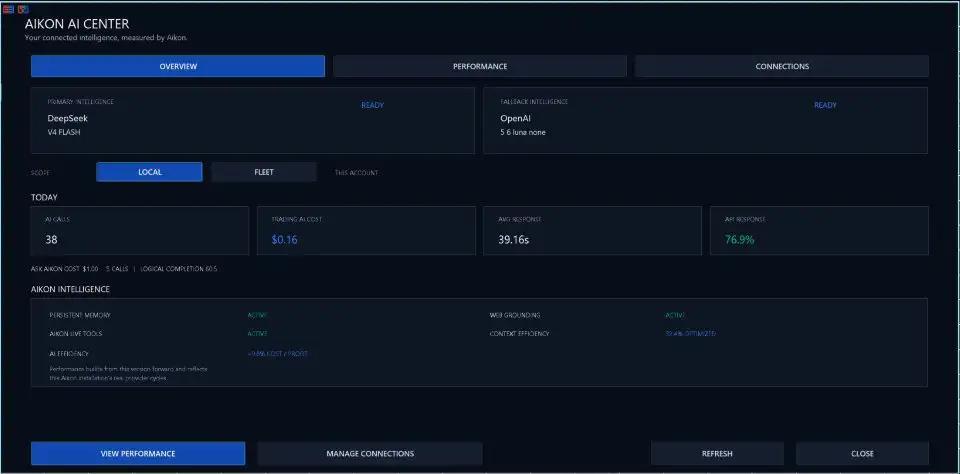
Aikon MT5 includes AI Economics, designed to provide visibility into AI usage.
The system can track information such as:
- AI calls
- Response times
- Token usage
- Tracked API costs
- Tool usage
- Web usage
External AI provider charges remain separate and depend on the provider, model, configuration, market activity, and conversations.
Aikon is designed to reduce unnecessary duplicate AI work while preserving relevant context and sharing intelligence across connected accounts where appropriate.
Backtesting Aikon MT5
The MetaTrader 5 Strategy Tester can be used to examine the mechanical behavior available within simulation.
However, traditional backtesting has limitations when evaluating the complete Aikon workflow.
The Strategy Tester does not execute the WebRequest connections required for features such as:
- Live AI conversations
- External provider research
- Telegram operation
- Connected AI workflows
Therefore, a conventional backtest should not be interpreted as a complete simulation of every connected AIKON feature.
The Strategy Tester can help evaluate supported mechanical trading behavior, while demonstrations and appropriate live or Demo testing can be used to understand conversational and connected functionality.
MetaTrader 5 Requirements
Automated trading and ongoing monitoring require MetaTrader 5 to remain running and connected.
Users should ensure that:
- MT5 is active
- The trading account is connected
- Required trading permissions are enabled
- Internet connectivity is available
- Required provider credentials are configured
- The necessary automated-trading permissions are enabled
For continuous operation, traders may also consider a reliable VPS environment where appropriate.
Account and Strategy Considerations
Different account types can affect how the EA operates.
For example, Netting accounts cannot run Recovery according to the supplied specifications.
Other account-level restrictions, including FIFO or no-hedge conditions, can also influence execution behavior.
Users should therefore verify their broker’s account structure and trading rules before enabling specific strategies.
Who Is Aikon MT5 Designed For?
Aikon MT5 may be relevant to traders who are interested in:
- AI-powered Expert Advisors
- Automated Forex trading
- Automated Gold trading
- XAUUSD automation
- Conversational trading control
- AI trading assistants
- MetaTrader 5 automation
- Automated money management
- Multi-account trading systems
- Telegram-based trading monitoring
- AI-assisted market research
- Automated alerts and monitoring
- Rule-based trading systems
- Forex recovery strategies
The system is particularly suited to users who want to combine automated execution with a more conversational way of understanding and managing their trading environment.
Key Features of Aikon MT5
AI-Powered Automated Trading
Aikon MT5 combines algorithmic trading with AI-assisted analysis and conversational interaction.
Ask Aikon
Interact with the trading system using natural-language requests instead of relying exclusively on conventional configuration menus.
Confirmation-Based Operational Changes
Requested changes can be presented for review and confirmation before being applied.
Automated Forex and Gold Trading
The system supports trading approaches including Forex Single Entry, Gold Single Entry, and optional Forex Recovery configurations.
Capital Management
Operating Capital, Protected Reserve, and Harvestable Profit provide additional ways to define how much capital can participate in new trading activity.
Trading Constitution
Create continuing trading and protection rules that remain part of the system’s operating framework.
Temporary Plans
Prepare time-limited trading or monitoring objectives with defined conditions and expiration.
Telegram Integration
Use Ask Aikon from a paired Telegram account to review information and prepare or confirm operational requests.
AIKON Initiative
Receive attention for meaningful system developments without allowing Initiative to independently place trades or change trading settings.
Multi-Account Architecture
Connect multiple accounts through the Master / Node structure while maintaining individual account controls.
AI Economics
Monitor AI usage, tokens, response times, and tracked API costs.
Web Research and File Context
Where supported by the selected provider, use current research and uploaded files as additional context for AI conversations.
Before You Begin
Before using Aikon MT5, users should consider the following requirements:
- AI functionality requires internet access and configured provider credentials.
- External AI provider charges are separate from the product.
- Automated trading and ongoing automation require a running and connected MetaTrader 5 terminal.
- Relevant trading permissions must be enabled.
- Web, file, and model functionality depends on the selected provider.
- Netting accounts cannot run the Recovery approach.
- FIFO and no-hedge restrictions may affect execution.
- AIKON does not guarantee profits or remove the user’s responsibility for trading and capital decisions.
Why Aikon MT5 Takes a Different Approach
Aikon MT5 is designed around the idea that traders should spend less time searching through settings and more time understanding what their trading system is doing.
The combination of automated execution and conversational control provides a different interaction model for an Expert Advisor.
Instead of only configuring parameters manually, traders can ask questions about their system, review proposed changes, investigate market conditions, and monitor their connected accounts.
The goal is not to eliminate trader responsibility. Instead, the system is designed to give traders more visibility and a more accessible way to interact with their automated trading environment.
Final Overview
Aikon MT5 is an AI-powered MetaTrader 5 Expert Advisor that combines automated trading, conversational AI control, money management, monitoring, research, and multi-account capabilities.
Its Ask Aikon interface provides a natural-language way to understand the trading system, investigate why certain conditions did or did not result in trades, review exposure, and prepare operational changes.
The system can support Forex and Gold trading approaches, including Single Entry configurations and an optional Forex Recovery approach. Capital controls, a Trading Constitution, temporary plans, alerts, Telegram access, AIKON Initiative, and Master / Node account architecture expand the system beyond conventional EA configuration.
At the same time, automated trading does not remove market risk. Strategy settings, position sizing, execution quality, broker conditions, leverage, liquidity, and market volatility can all affect results.
Backtesting can help examine supported mechanical behavior, but it does not reproduce the complete connected AIKON environment, including live AI conversations, WebRequest functionality, external research, and Telegram operation.
Users should therefore evaluate Aikon MT5 carefully, begin with a setup they understand, test the system appropriately, and maintain control over their trading rules and capital allocation.
Risk Disclaimer
Trading Forex, Gold, and other leveraged financial instruments involves substantial risk and may not be suitable for every investor.
Aikon MT5 is an automated trading tool and does not guarantee profits, eliminate drawdown, or prevent losses. AI-generated analysis, automated signals, and algorithmic execution can produce incorrect decisions or losing trades.
Actual results may be affected by market volatility, spread, slippage, liquidity, broker execution, leverage, account size, trading configuration, VPS performance, technical interruptions, and other factors.
Recovery-based trading can potentially increase market exposure during adverse movements and should only be enabled after the relevant rules and risks are understood.
AI research and conversational functionality should not be treated as a guarantee of market direction or trading success. Users remain responsible for their trading decisions, risk management, account configuration, and capital allocation.
Always test Aikon MT5 in an appropriate environment before live deployment, understand its settings and permissions, and trade only with capital you can afford to lose.













Reviews
There are no reviews yet.