 English
 فارسی
فارسی



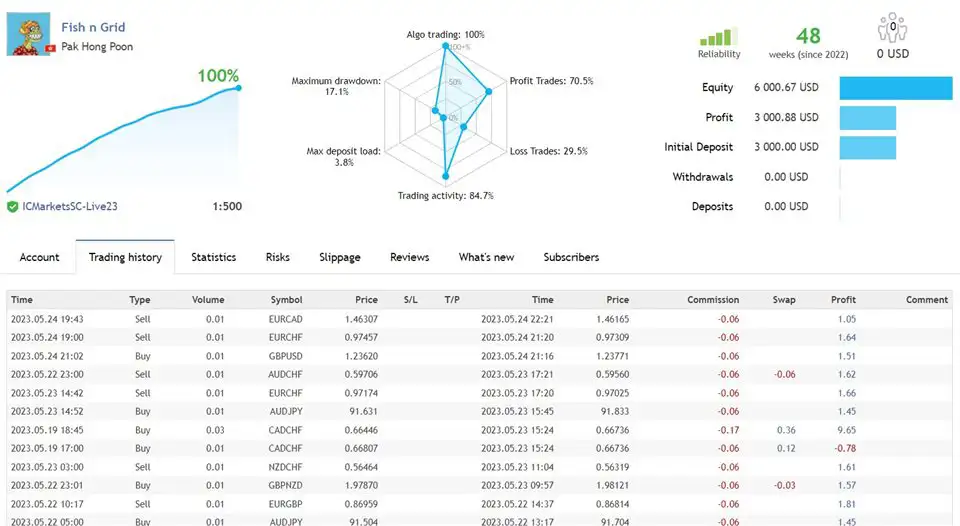
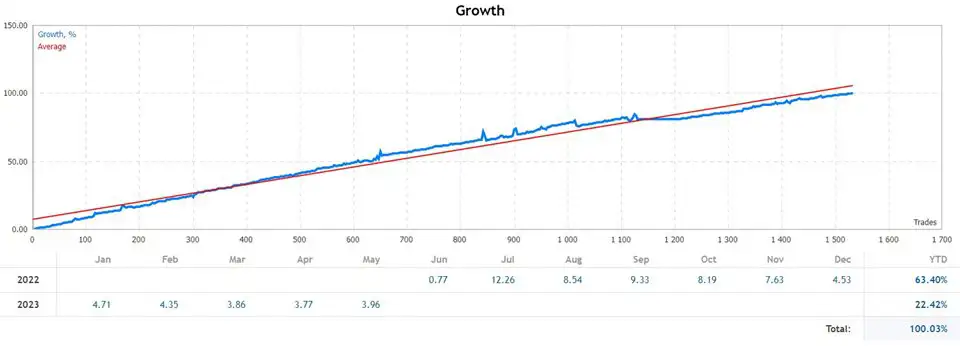
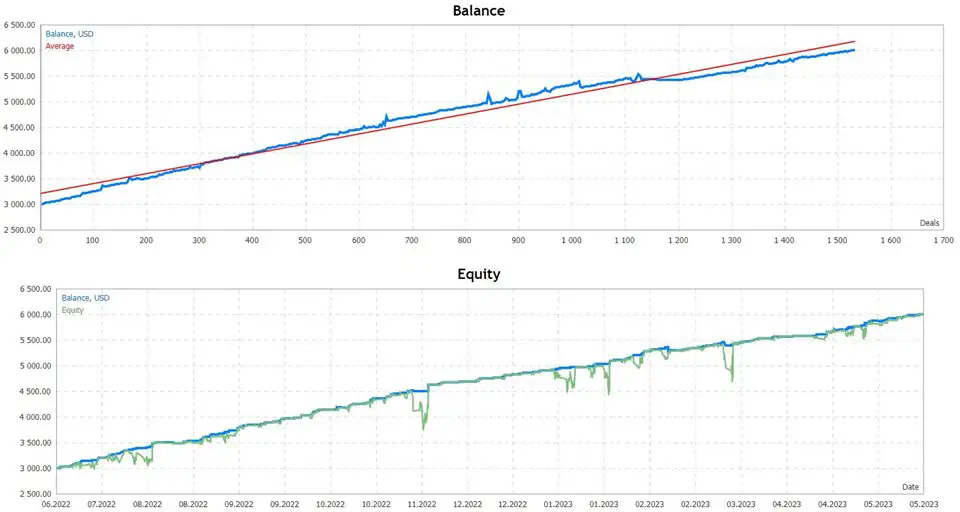
Fish n Grid MT4 – Intelligent Multi-Currency Grid Trading System for MT4
Fish n Grid MT4 is a fully automated Expert Advisor designed for traders who want a powerful, multi-currency grid trading solution built on the principles of mean reversion.
Using a dynamic, calculated grid algorithm, this EA simultaneously manages multiple currency pairs, taking advantage of the market’s natural tendency to revert to the mean.
With its professional-grade portfolio structure, Fish n Grid MT4 provides stable long-term performance while allowing traders to customize risk levels based on account size and broker conditions.
Key Features of Fish n Grid MT4
• Fully Automated Trading
Once installed, the EA handles all trade entries, grid levels, risk controls, and portfolio management.
• One-Chart Setup
Trade 18+ forex pairs from a single EURUSD H1 chart for a clean and simple setup experience.
• Multi-Currency Grid Portfolio
Fish n Grid MT4 runs a diversified grid system across multiple low-correlation currency pairs to balance risk and enhance profit opportunities.
• Daily Trading Activity
Thanks to its mean-reversion logic, the EA generates trading opportunities almost every day across supported pairs.
• Optimized Parameters for Each Pair
Every pair includes pre-calculated grid settings, spacing, and volatility-adjusted parameters.
• Dynamic Stop Loss System
During periods of reduced volatility such as nighttime sessions, the EA may apply a dynamic stop loss to protect capital under specific conditions.
• Manual Control Flexibility
Users can manually close entire currency grid chains when needed—without disrupting the EA’s functionality.
Requirements for Best Performance
To achieve optimal performance, the following conditions are recommended:
- Hedging account required
- Low-spread raw ECN broker
- Minimum balance: 3000 USD
- VPS recommended for 24/5 uptime
Recommended Trading Setup
Primary Supported Pairs
AUDCAD, AUDCHF, AUDJPY, AUDUSD, CADCHF, EURCAD, EURCHF, EURGBP, EURJPY,
EURUSD, GBPCHF, GBPNZD, GBPUSD, NZDCAD, NZDCHF, USDCAD, USDCHF
Higher-Risk Pairs
AUDNZD, USDCAD
How to Set Up Fish n Grid MT4
Step-by-Step Setup
- Download and install the EA into your MT4 platform.
- Open the EURUSD – H1 timeframe
- Drag the EA onto the chart — the default settings load automatically.
- Set Multicurrency_Switch = true.
- Adjust First_Order_Lot_Size based on your account size.
- Configure Stoploss_In_Dollar according to your preferred risk level.
- Example:
- Start lot: 0.01
- Minimum deposit: 3000 USD
- Recommended Stoploss_In_Dollar: 3000 USD
- Example:
- Enable AutoTrading and let the EA run.
Optional Settings
• Multiple Chart Setup
If you prefer running each pair manually:
Set Multicurrency_Switch = false and attach the EA to each individual pair.
• Manual TP/SL Control
In extreme market conditions, you can manually close an entire grid chain for any currency without disrupting the EA.
• Prefix/Suffix Compatibility
For brokers using symbol modifiers, enable prefix/suffix detection inside the settings.
Important Disclaimer
- Backtest results do not guarantee future performance.
- Always trade with a risk level you feel comfortable with.
- Start with a demo account to understand how the EA works.
- Use a reliable ECN broker and a stable VPS for best performance.
Trade smart, trade safe.











Reviews
There are no reviews yet.